# 产品介绍
Doubao-Seedream-5.0-lite是字节跳动发布的最新图像创作模型。该模型首次搭载联网检索功能,能融合实时网络信息,提升生图时效性。同时,模型的聪明度进一步升级,能够精准解析复杂指令和视觉内容。此外,模型在世界知识广度、参考一致性及专业场景生成质量上均有增强,可更好地满足企业级视觉创作需求。
**快速上手**
Doubao-Seedream-5.0-lite 原生支持文本、单图和多图输入,实现基于主体一致性的多图融合创作、图像编辑、组图生成等多样玩法,让图像创作更加自由可控。本文以 Doubao Seedream 5.0 lite 为例介绍如何调用 [Image generation API](https://www.volcengine.com/docs/82379/1541523) 进行图像创作。如需使用 Doubao Seedream 4.5/4.0 模型,将下文代码示例中的 model 字段替换为对应的 Model ID 即可。
> 说明:方舟平台的新用户?获取 API Key 及 开通模型等准备工作,请参见 [快速入门](https://www.volcengine.com/docs/82379/1399008)。
## 模型效果
更多效果示例见 [效果预览](https://console.volcengine.com/ark/region:ark+cn-beijing/model/detail?Id=doubao-seedream-5-0)。
| 场景 | 输入 | 输出 |
|---|---|---|
| 文生图 `联网搜索`
> Doubao Seedream 5.0 lite 模型可通过联网搜索功能,融合实时网络信息,提升生图时效性。 | 制作一张上海未来5日的天气预报图,采用现代扁平化插画风格,清晰展示每日天气、温度和穿搭建议。整体为横向排版,标题为“上海未来5日天气预报“,包含5个等宽的垂直卡片,从左到右依次排列。整体风格为现代、干净、友好的扁平化矢量插画风格,线条清晰,色彩柔和。人物形象采用年轻男女的卡通插画,表情自然,姿态放松,服装细节清晰。 | 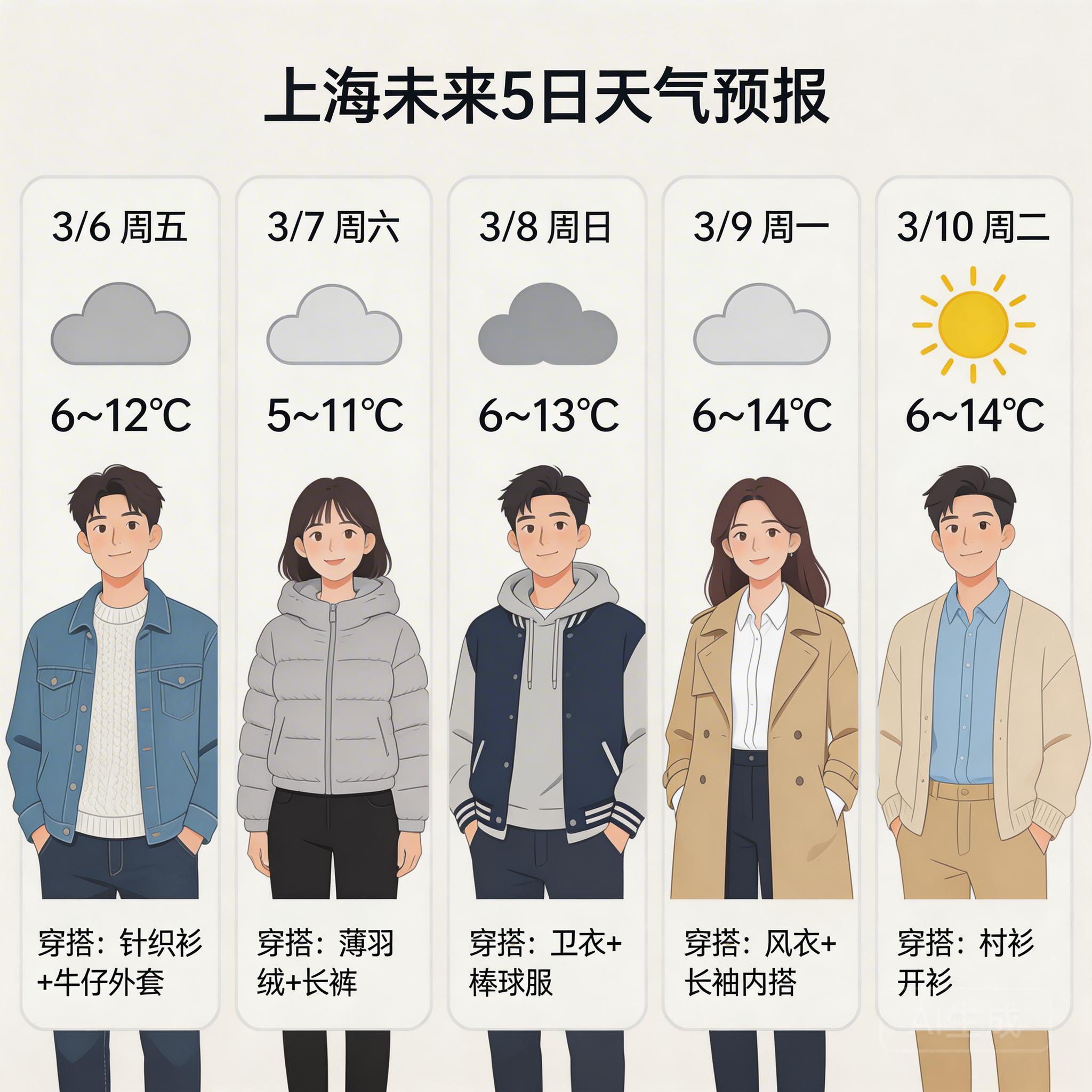 |
| 多参考图生图
> 输入多张参考图,融合它们的风格、元素等特征来生成新图像。 | 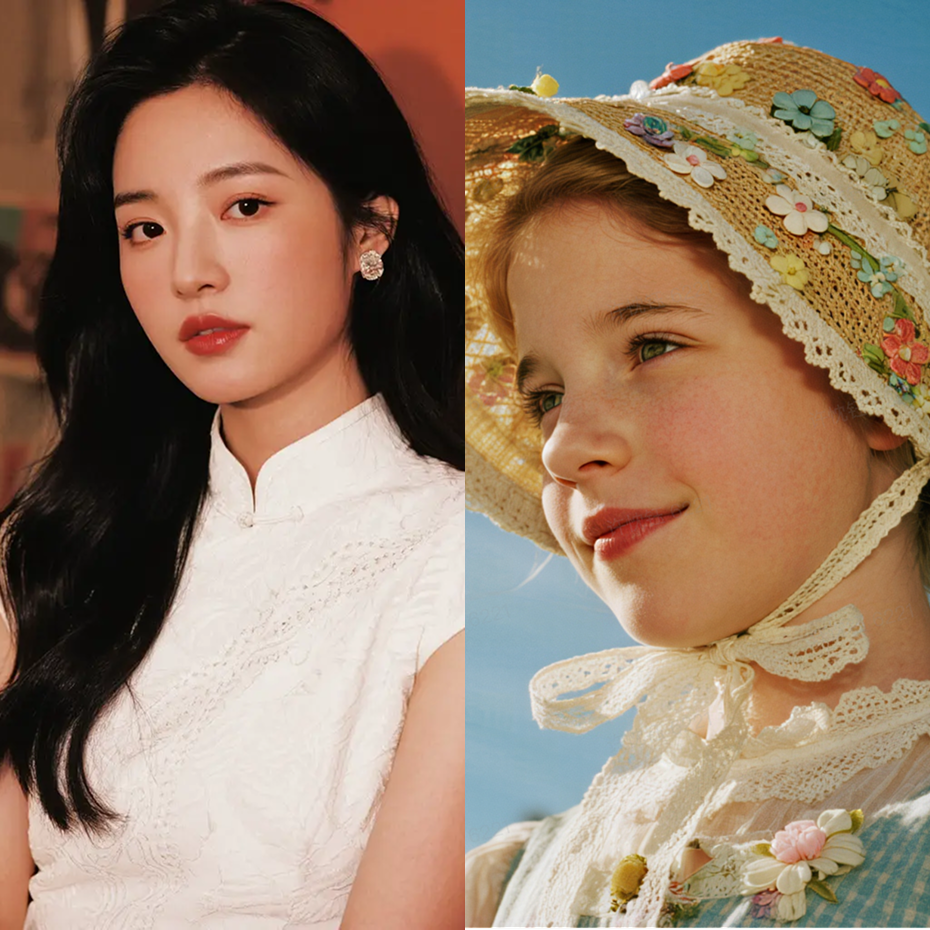
> 将图1的服装换为图2的服装 | 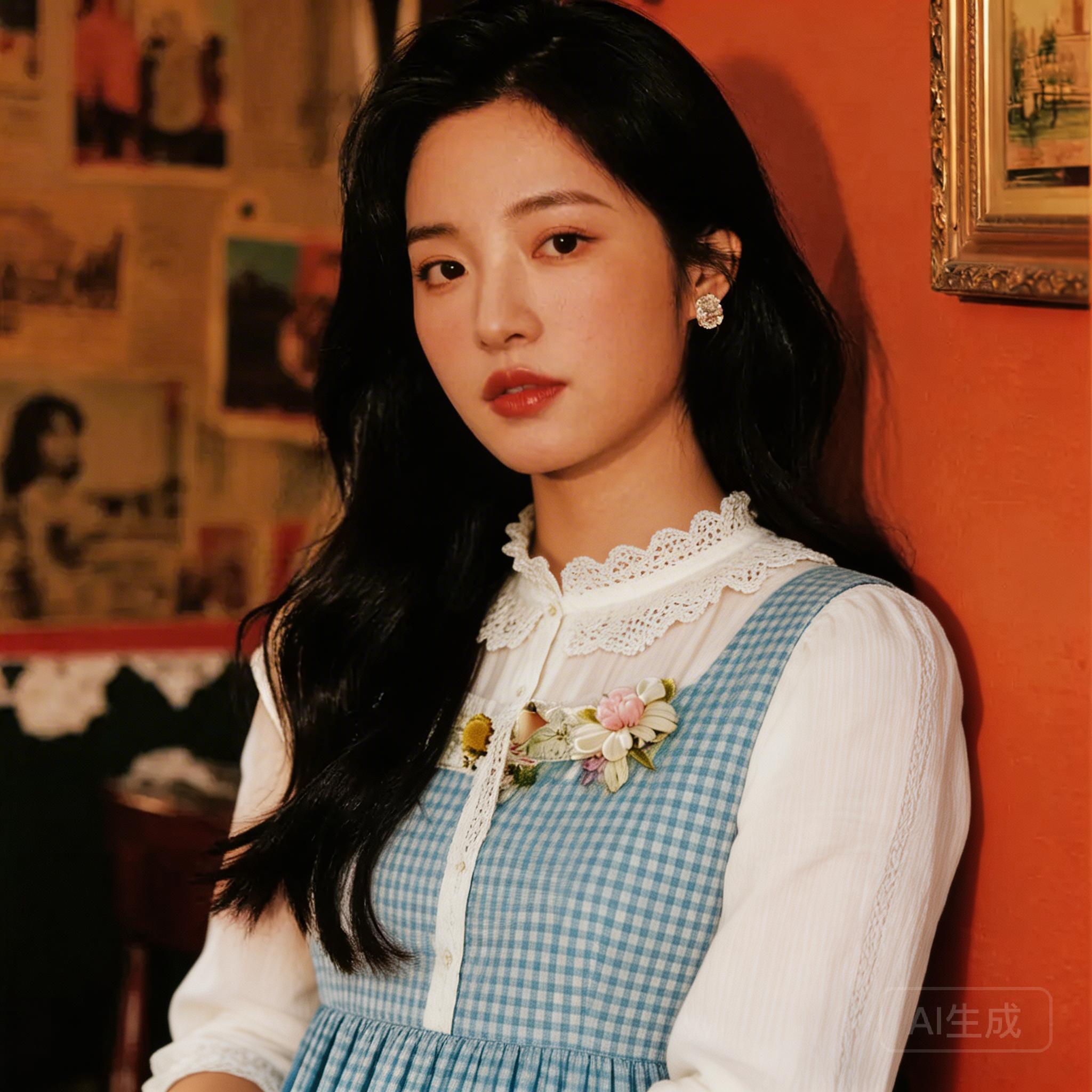 |
| 组图生成
> 基于用户输入的文字和图片,生成一组内容关联的图像 | 
> 参考图1,生成四图片,图中人物分别带着墨镜,骑着摩托,带着帽子,拿着棒棒糖 | 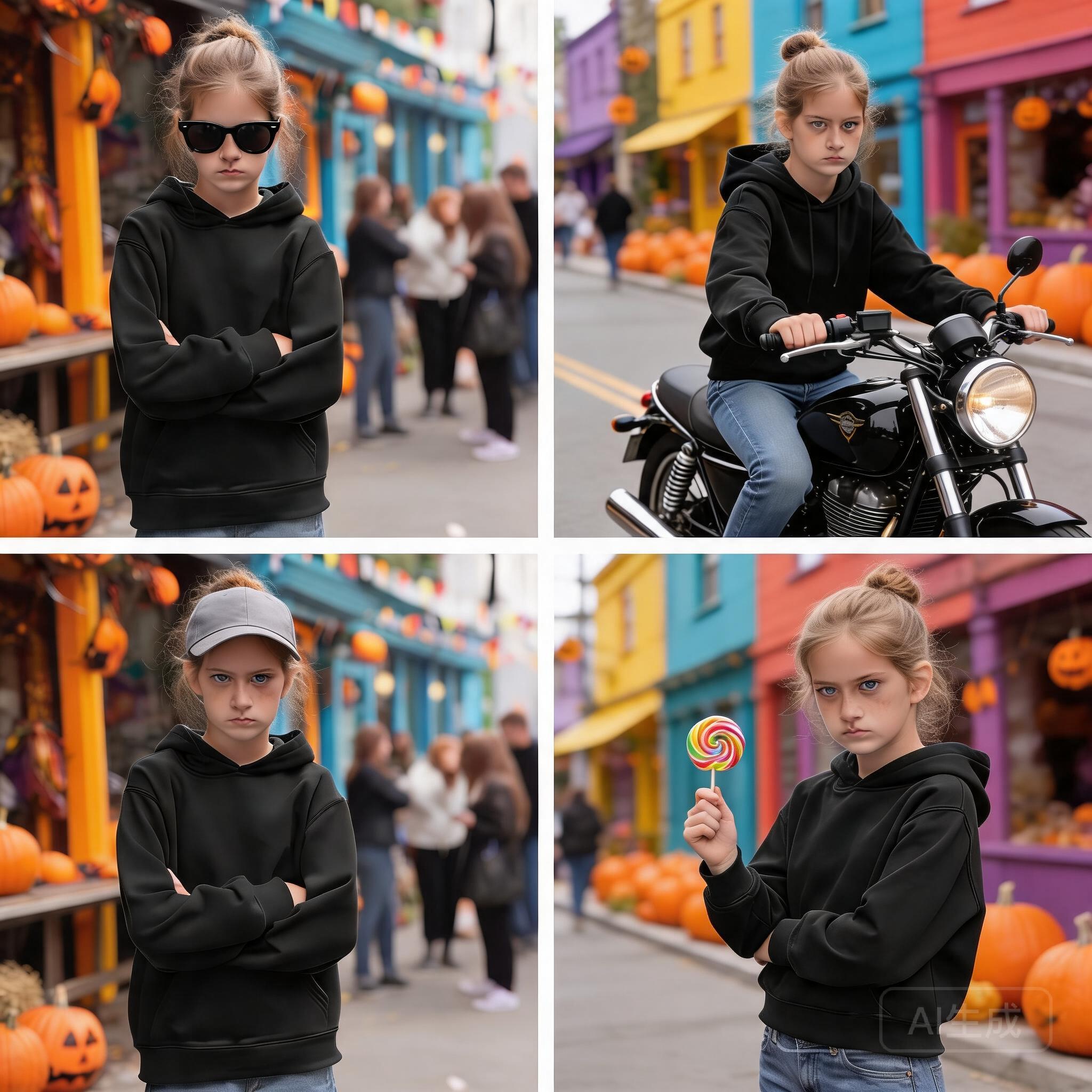 |
## 模型能力
| 模型名称 | [Doubao Seedream 5.0 lite](https://console.volcengine.com/ark/region:ark+cn-beijing/model/detail?Id=doubao-seedream-5-0) | [Doubao Seedream 4.5](https://console.volcengine.com/ark/region:ark+cn-beijing/model/detail?Id=doubao-seedream-4-5) | [Doubao Seedream 4.0](https://console.volcengine.com/ark/region:ark+cn-beijing/model/detail?Id=doubao-seedream-4-0) |
|---|---|---|---|
| 模型 ID (Model ID) | doubao-seedream-5-0-260128 (同时支持:doubao-seedream-5-0-lite-260128) | doubao-seedream-4-5-251128 | doubao-seedream-4-0-250828 |
| 文生图 |  |  |  |
| 文生组图 |  |  |  |
| 单/多图生图 |  |  |  |
| 单/多图生组图 |  |  |  |
| 流式输出 |  |  |  |
| 联网搜索 |  |  |  |
| 模型参数 | 分辨率:2K, 3K, 4K
输出格式:png, jpeg
提示词优化模式:标准模式
生成数量:输入的参考图数量 + 最终生成的图片数量 ≤ 15张 | 分辨率:2K, 4K
输出格式:jpeg
提示词优化模式:标准模式 | 分辨率:1K, 2K, 4K
输出格式:jpeg
提示词优化模式:标准模式, 极速模式 |
| 限流 IPM(张/分钟) | 500 | 500 | 500 |
## 快速体验
您可在火山方舟平台 [API Explorer](https://api.volcengine.com/api-explorer/?action=ImageGenerations&groupName=%E5%9B%BE%E7%89%87%E7%94%9F%E6%88%90API&serviceCode=ark&tab=2&version=2024-01-01#N4IgTgpgzgDg9gOyhA+gMzmAtgQwC4gBcIArmADYgA0IUAlgF4REgBMA0tSAO74TY4wAayJoc5ZDSxwAJhErEZcEgCMccALTIIMyDiwaALBoAMG1gFYTADlbWuMMHCwwCxQPhmgUTTA-l6Ao2MAw-4CLeYB4tkHBgDOJgE2KgF+KgABygGHxgNf6gPSmgN2egCwegHEegCFugLCagCfKgOhKgGbx-oBFRoBjkYCTkZGA34qA2Ur+gKyugI76gOSagOJO-oDU5oCnpoBHphWA+Ib+gBVKI4Cf2oAr1oBOQf5wAMaATHaAy+b+gJKKgP1+gL-xgFRxY4CABoCEVoBTPv6A9maAj7b+gKGxgA3OgHnagNxygJJy-peAuyH+gNyugEbpgFgJgHH4wBjfoBvQOygAY5QAz2tkZoBLfUAQjqAQmtAIoagAIEp6AZXlAHBygC51c7+QAUsUNAPjuD38gHSzQKAOYzADMB52y6xagAlTQA55oBSELR0UA2DaAF7V-IAXU0xgB9FQDuioAvIMA9OaAbz1AM8GI0AHJqAAn1soB-PUAS5GAeASKmz-IAAAPW-kAs8qAEB1-IBA80AL4GMlr+QBc+oBUfUagDwVQA2aiAAL5AA),快速体验图片生成功能,支持自定义参数(例如设置图片水印、控制输出图片大小等),方便您直观感受其效果和性能。
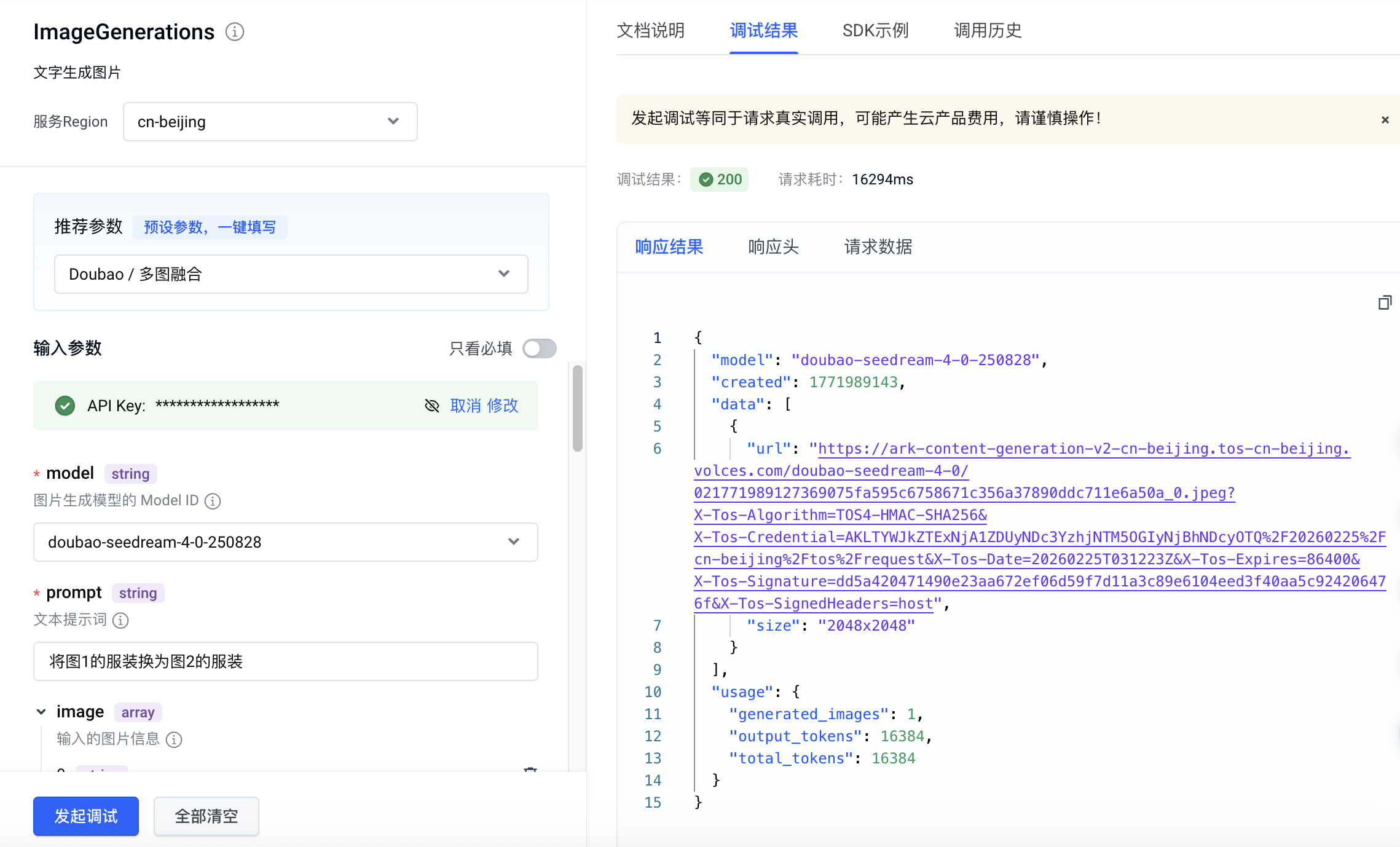
## 基础使用
### 文生图(纯文本输入单图输出)
通过给模型提供清晰准确的文字指令,即可快速获得符合描述的高质量单张图片。
| 提示词 | 输出 |
|---|---|
| 充满活力的特写编辑肖像,模特眼神犀利,头戴雕塑感帽子,色彩拼接丰富,眼部焦点锐利,景深较浅,具有Vogue杂志封面的美学风格,采用中画幅拍摄,工作室灯光效果强烈。 | 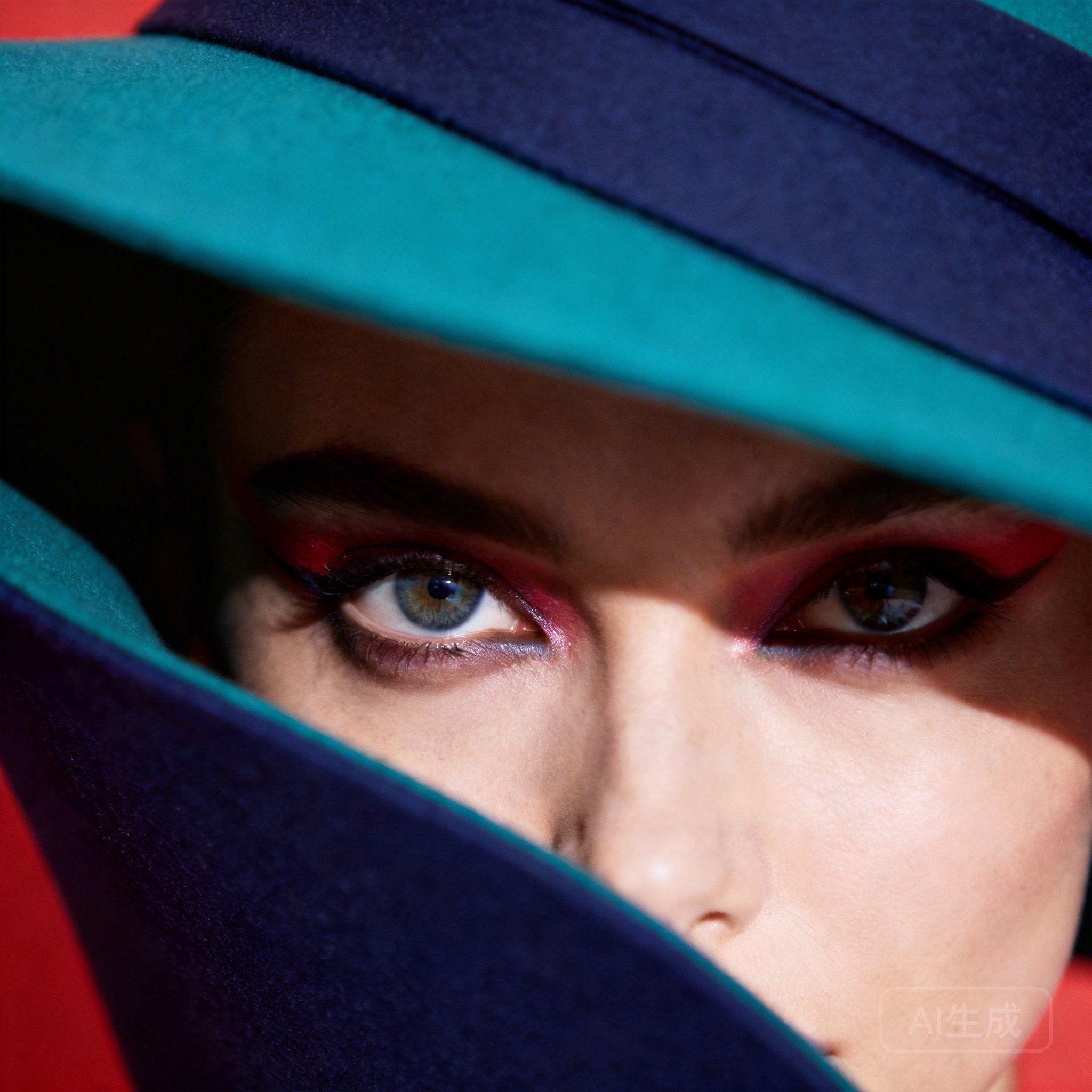 |
**Curl**
```Bash
curl https://ark.cn-beijing.volces.com/api/v3/images/generations \
-H "Content-Type: application/json" \
-H "Authorization: Bearer $ARK_API_KEY" \
-d '{
"model": "doubao-seedream-5-0-260128",
"prompt": "充满活力的特写编辑肖像,模特眼神犀利,头戴雕塑感帽子,色彩拼接丰富,眼部焦点锐利,景深较浅,具有Vogue杂志封面的美学风格,采用中画幅拍摄,工作室灯光效果强烈。",
"size": "2K",
"output_format":"png",
"watermark": false
}'
```
- 您可按需替换 Model ID。Model ID 查询见 [模型列表](https://www.volcengine.com/docs/82379/1330310)。
**Python**
```Python
import os
# Install SDK: pip install 'volcengine-python-sdk[ark]' .
from volcenginesdkarkruntime import Ark
client = Ark(
# The base URL for model invocation
base_url="https://ark.cn-beijing.volces.com/api/v3",
# Get API Key:https://console.volcengine.com/ark/region:ark+cn-beijing/apikey
api_key=os.getenv('ARK_API_KEY'),
)
imagesResponse = client.images.generate(
# Replace with Model ID
model="doubao-seedream-5-0-260128",
prompt="充满活力的特写编辑肖像,模特眼神犀利,头戴雕塑感帽子,色彩拼接丰富,眼部焦点锐利,景深较浅,具有Vogue杂志封面的美学风格,采用中画幅拍摄,工作室灯光效果强烈。",
size="2K",
output_format="png",
response_format="url",
watermark=False
)
print(imagesResponse.data[0].url)
```
**Java**
```Java
package com.ark.sample;
import com.volcengine.ark.runtime.model.images.generation.*;
import com.volcengine.ark.runtime.service.ArkService;
import okhttp3.ConnectionPool;
import okhttp3.Dispatcher;
import java.util.Arrays;
import java.util.List;
import java.util.concurrent.TimeUnit;
public class ImageGenerationsExample {
public static void main(String[] args) {
// Get API Key:https://console.volcengine.com/ark/region:ark+cn-beijing/apikey
String apiKey = System.getenv("ARK_API_KEY");
ConnectionPool connectionPool = new ConnectionPool(5, 1, TimeUnit.SECONDS);
Dispatcher dispatcher = new Dispatcher();
ArkService service = ArkService.builder()
.baseUrl("https://ark.cn-beijing.volces.com/api/v3") // The base URL for model invocation
.dispatcher(dispatcher)
.connectionPool(connectionPool)
.apiKey(apiKey)
.build();
GenerateImagesRequest generateRequest = GenerateImagesRequest.builder()
.model("doubao-seedream-5-0-260128") // Replace with Model ID
.prompt("充满活力的特写编辑肖像,模特眼神犀利,头戴雕塑感帽子,色彩拼接丰富,眼部焦点锐利,景深较浅,具有Vogue杂志封面的美学风格,采用中画幅拍摄,工作室灯光效果强烈。")
.size("2K")
.sequentialImageGeneration("disabled")
.outputFormat("png")
.responseFormat(ResponseFormat.Url)
.stream(false)
.watermark(false)
.build();
ImagesResponse imagesResponse = service.generateImages(generateRequest);
System.out.println(imagesResponse.getData().get(0).getUrl());
service.shutdownExecutor();
}
}
```
**Go**
```Go
package main
import (
"context"
"fmt"
"os"
"github.com/volcengine/volcengine-go-sdk/service/arkruntime"
"github.com/volcengine/volcengine-go-sdk/service/arkruntime/model"
"github.com/volcengine/volcengine-go-sdk/volcengine"
)
func main() {
client := arkruntime.NewClientWithApiKey(
// Get API Key:https://console.volcengine.com/ark/region:ark+cn-beijing/apikey
os.Getenv("ARK_API_KEY"),
// The base URL for model invocation
arkruntime.WithBaseUrl("https://ark.cn-beijing.volces.com/api/v3"),
)
ctx := context.Background()
outputFormat := model.OutputFormatPNG
generateReq := model.GenerateImagesRequest{
Model: "doubao-seedream-5-0-260128", // Replace with Model ID
Prompt: "充满活力的特写编辑肖像,模特眼神犀利,头戴雕塑感帽子,色彩拼接丰富,眼部焦点锐利,景深较浅,具有Vogue杂志封面的美学风格,采用中画幅拍摄,工作室灯光效果强烈。",
Size: volcengine.String("2K"),
OutputFormat: &outputFormat,
ResponseFormat: volcengine.String("url"),
Watermark: volcengine.Bool(false),
}
imagesResponse, err := client.GenerateImages(ctx, generateReq)
if err != nil {
fmt.Printf("generate images error: %v\n", err)
return
}
fmt.Printf("%s\n", *imagesResponse.Data[0].Url)
}
```
**OpenAI**
```Python
import os
from openai import OpenAI
client = OpenAI(
# The base URL for model invocation
base_url="https://ark.cn-beijing.volces.com/api/v3",
# Get API Key:https://console.volcengine.com/ark/region:ark+cn-beijing/apikey
api_key=os.getenv('ARK_API_KEY'),
)
imagesResponse = client.images.generate(
# Replace with Model ID
model="doubao-seedream-5-0-260128",
prompt="充满活力的特写编辑肖像,模特眼神犀利,头戴雕塑感帽子,色彩拼接丰富,眼部焦点锐利,景深较浅,具有Vogue杂志封面的美学风格,采用中画幅拍摄,工作室灯光效果强烈。",
size="2K",
output_format="png",
response_format="url",
extra_body={
"watermark": False,
},
)
print(imagesResponse.data[0].url)
```
### 图文生图(单图输入单图输出)
基于已有图片,结合文字指令进行图像编辑,包括图像元素增删、风格转化、材质替换、色调迁移、改变背景/视角/尺寸等。
| 提示词 | 输入图 | 输出 |
|---|---|---|
| 保持模特姿势和液态服装的流动形状不变。将服装材质从银色金属改为完全透明的清水(或玻璃)。透过液态水流,可以看到模特的皮肤细节。光影从反射变为折射。 | 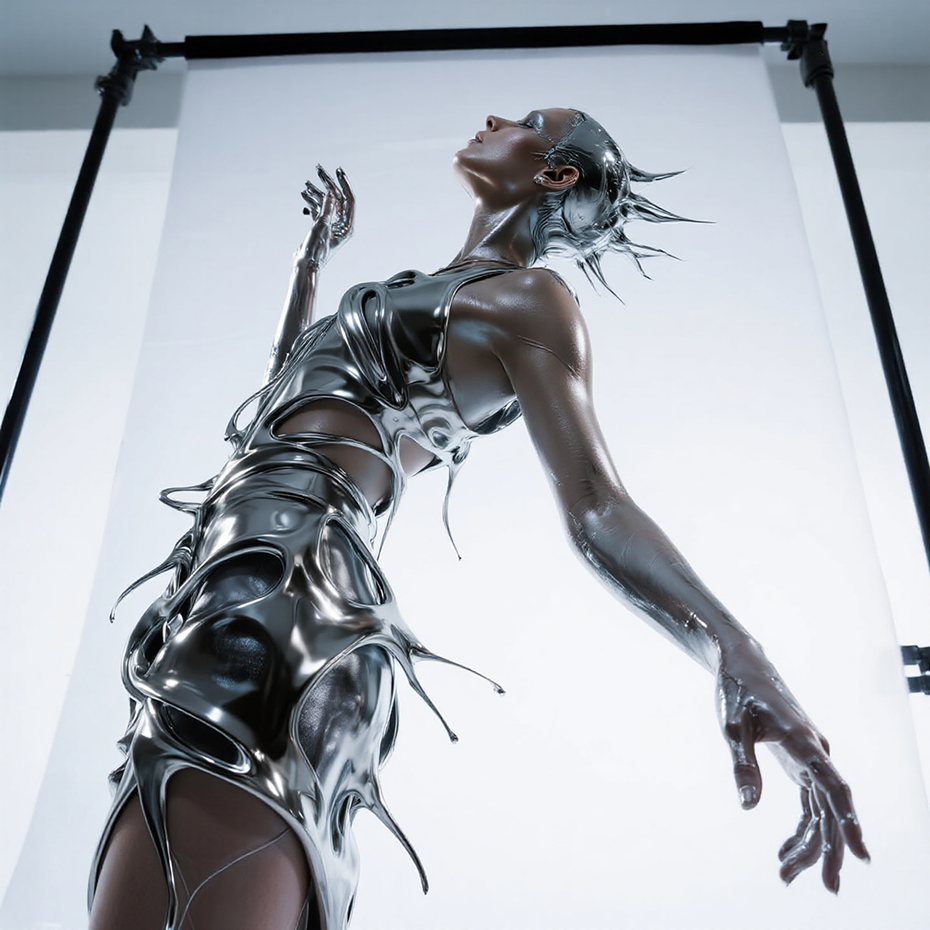 | 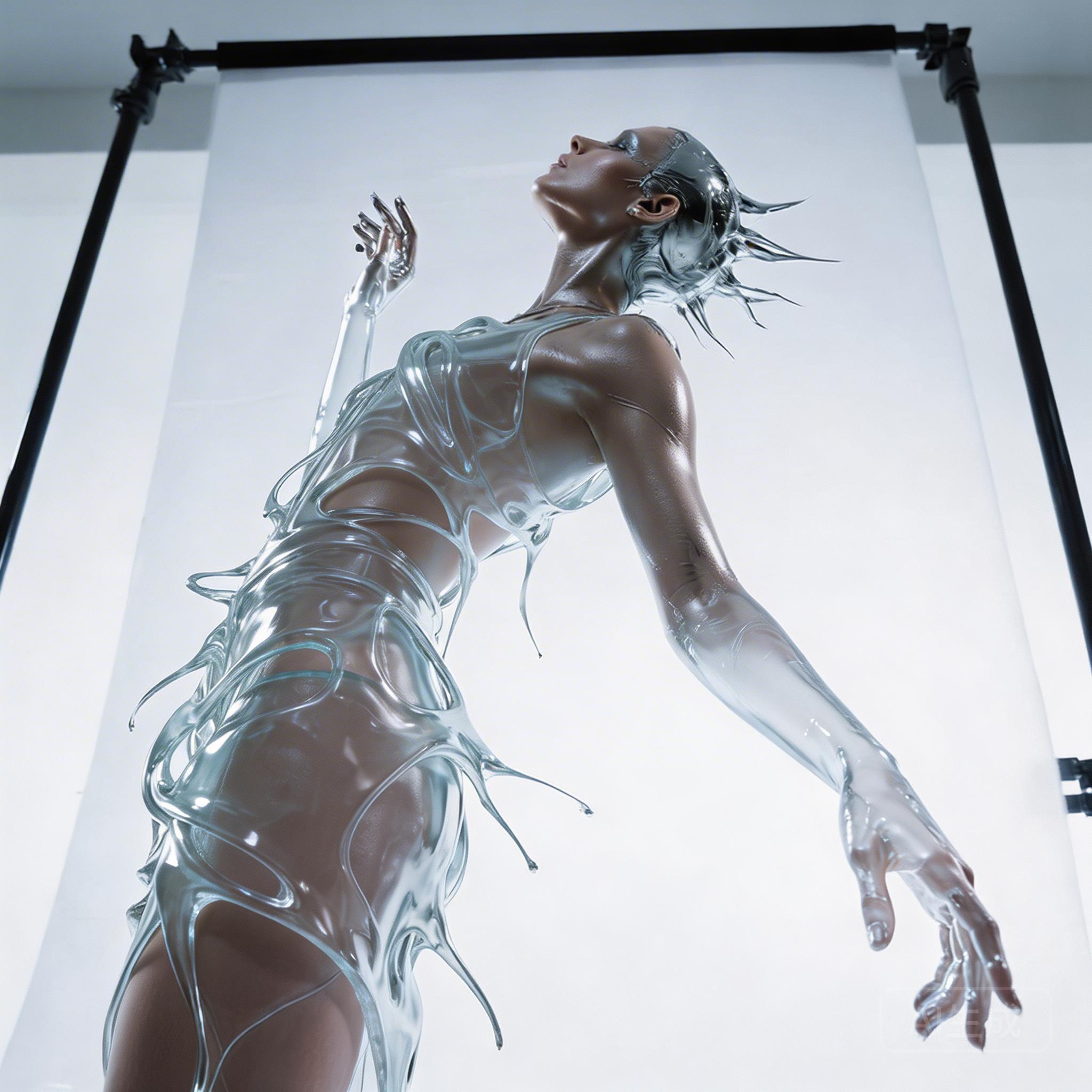 |
**Curl**
```Bash
curl https://ark.cn-beijing.volces.com/api/v3/images/generations \
-H "Content-Type: application/json" \
-H "Authorization: Bearer $ARK_API_KEY" \
-d '{
"model": "doubao-seedream-5-0-260128",
"prompt": "保持模特姿势和液态服装的流动形状不变。将服装材质从银色金属改为完全透明的清水(或玻璃)。透过液态水流,可以看到模特的皮肤细节。光影从反射变为折射。",
"image": "https://ark-project.tos-cn-beijing.volces.com/doc_image/seedream4_5_imageToimage.png",
"size": "2K",
"output_format":"png",
"watermark": false
}'
```
- 您可按需替换 Model ID。Model ID 查询见 [模型列表](https://www.volcengine.com/docs/82379/1330310)。
**Python**
```Python
import os
# Install SDK: pip install 'volcengine-python-sdk[ark]'
from volcenginesdkarkruntime import Ark
client = Ark(
# The base URL for model invocation
base_url="https://ark.cn-beijing.volces.com/api/v3",
# Get API Key:https://console.volcengine.com/ark/region:ark+cn-beijing/apikey
api_key=os.getenv('ARK_API_KEY'),
)
imagesResponse = client.images.generate(
# Replace with Model ID
model="doubao-seedream-5-0-260128",
prompt="保持模特姿势和液态服装的流动形状不变。将服装材质从银色金属改为完全透明的清水(或玻璃)。透过液态水流,可以看到模特的皮肤细节。光影从反射变为折射。",
image="https://ark-project.tos-cn-beijing.volces.com/doc_image/seedream4_5_imageToimage.png",
size="2K",
output_format="png",
response_format="url",
watermark=False
)
print(imagesResponse.data[0].url)
```
**Java**
```Java
package com.ark.sample;
import com.volcengine.ark.runtime.model.images.generation.*;
import com.volcengine.ark.runtime.service.ArkService;
import okhttp3.ConnectionPool;
import okhttp3.Dispatcher;
import java.util.Arrays;
import java.util.List;
import java.util.concurrent.TimeUnit;
public class ImageGenerationsExample {
public static void main(String[] args) {
String apiKey = System.getenv("ARK_API_KEY");
ConnectionPool connectionPool = new ConnectionPool(5, 1, TimeUnit.SECONDS);
Dispatcher dispatcher = new Dispatcher();
ArkService service = ArkService.builder()
.baseUrl("https://ark.cn-beijing.volces.com/api/v3") // The base URL for model invocation
.dispatcher(dispatcher)
.connectionPool(connectionPool)
.apiKey(apiKey)
.build();
GenerateImagesRequest generateRequest = GenerateImagesRequest.builder()
.model("doubao-seedream-5-0-260128") // Replace with Model ID
.prompt("保持模特姿势和液态服装的流动形状不变。将服装材质从银色金属改为完全透明的清水(或玻璃)。透过液态水流,可以看到模特的皮肤细节。光影从反射变为折射。")
.image("https://ark-project.tos-cn-beijing.volces.com/doc_image/seedream4_5_imageToimage.png")
.size("2K")
.sequentialImageGeneration("disabled")
.outputFormat("png")
.responseFormat(ResponseFormat.Url)
.stream(false)
.watermark(false)
.build();
ImagesResponse imagesResponse = service.generateImages(generateRequest);
System.out.println(imagesResponse.getData().get(0).getUrl());
service.shutdownExecutor();
}
}
```
**Go**
```Go
package main
import (
"context"
"fmt"
"os"
"github.com/volcengine/volcengine-go-sdk/service/arkruntime"
"github.com/volcengine/volcengine-go-sdk/service/arkruntime/model"
"github.com/volcengine/volcengine-go-sdk/volcengine"
)
func main() {
client := arkruntime.NewClientWithApiKey(
os.Getenv("ARK_API_KEY"),
// The base URL for model invocation
arkruntime.WithBaseUrl("https://ark.cn-beijing.volces.com/api/v3"),
)
ctx := context.Background()
outputFormat := model.OutputFormatPNG
generateReq := model.GenerateImagesRequest{
Model: "doubao-seedream-5-0-260128",
Prompt: "保持模特姿势和液态服装的流动形状不变。将服装材质从银色金属改为完全透明的清水(或玻璃)。透过液态水流,可以看到模特的皮肤细节。光影从反射变为折射。",
Image: volcengine.String("https://ark-project.tos-cn-beijing.volces.com/doc_image/seedream4_5_imageToimage.png"),
Size: volcengine.String("2K"),
OutputFormat: &outputFormat,
ResponseFormat: volcengine.String("url"),
Watermark: volcengine.Bool(false),
}
imagesResponse, err := client.GenerateImages(ctx, generateReq)
if err != nil {
fmt.Printf("generate images error: %v\n", err)
return
}
fmt.Printf("%s\n", *imagesResponse.Data[0].Url)
}
```
**OpenAI**
```Python
import os
from openai import OpenAI
client = OpenAI(
# The base URL for model invocation
base_url="https://ark.cn-beijing.volces.com/api/v3",
# Get API Key:https://console.volcengine.com/ark/region:ark+cn-beijing/apikey
api_key=os.getenv('ARK_API_KEY'),
)
imagesResponse = client.images.generate(
model="doubao-seedream-5-0-260128",
prompt="保持模特姿势和液态服装的流动形状不变。将服装材质从银色金属改为完全透明的清水(或玻璃)。透过液态水流,可以看到模特的皮肤细节。光影从反射变为折射。",
size="2K",
output_format="png",
response_format="url",
extra_body = {
"image": "https://ark-project.tos-cn-beijing.volces.com/doc_image/seedream4_5_imageToimage.png",
"watermark": False
}
)
print(imagesResponse.data[0].url)
```
### 多图融合(多图输入单图输出)
根据您输入的文本描述和多张参考图片,融合它们的风格、元素等特征来生成新图像。如衣裤鞋帽与模特图融合成穿搭图,人物与风景融合为人物风景图等。
| 提示词 | 输入图1 | 输入图2 | 输出 |
|---|---|---|---|
| 将图1的服装换为图2的服装 | 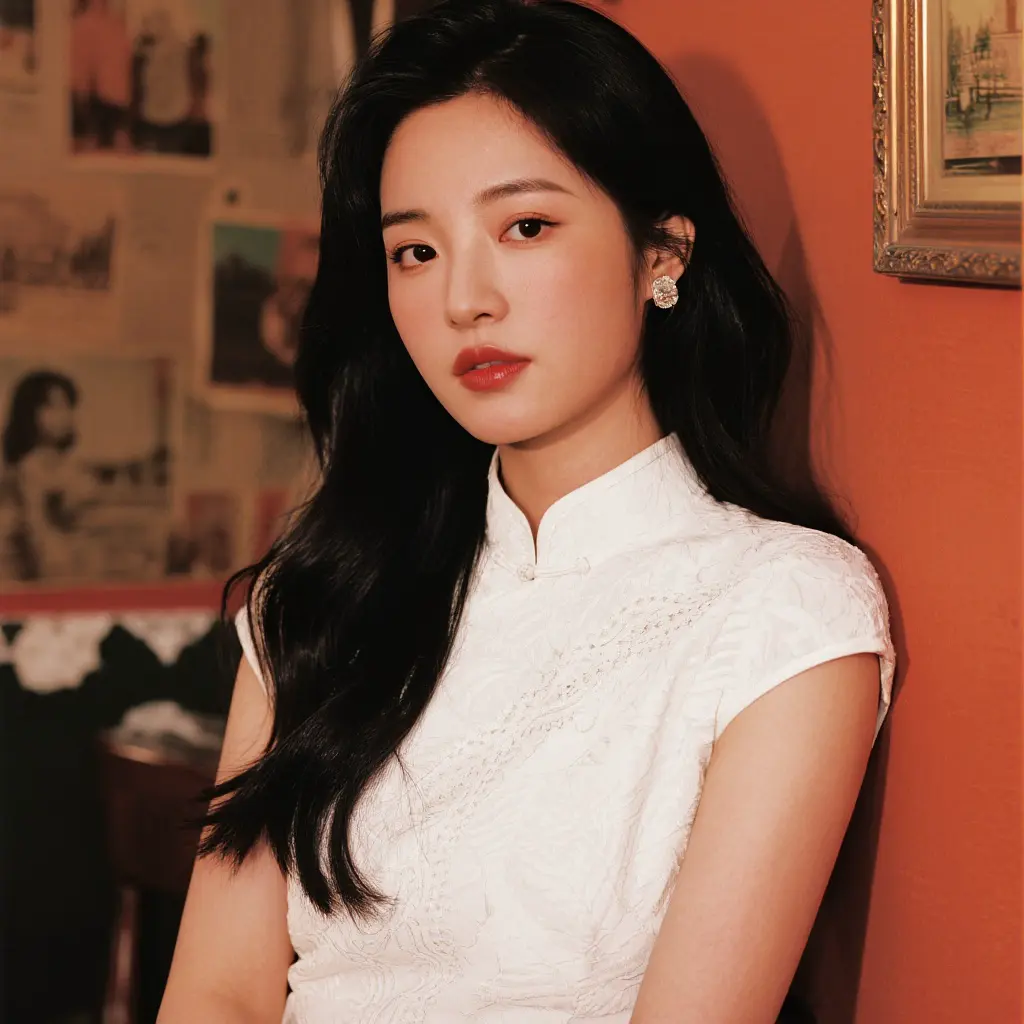 | 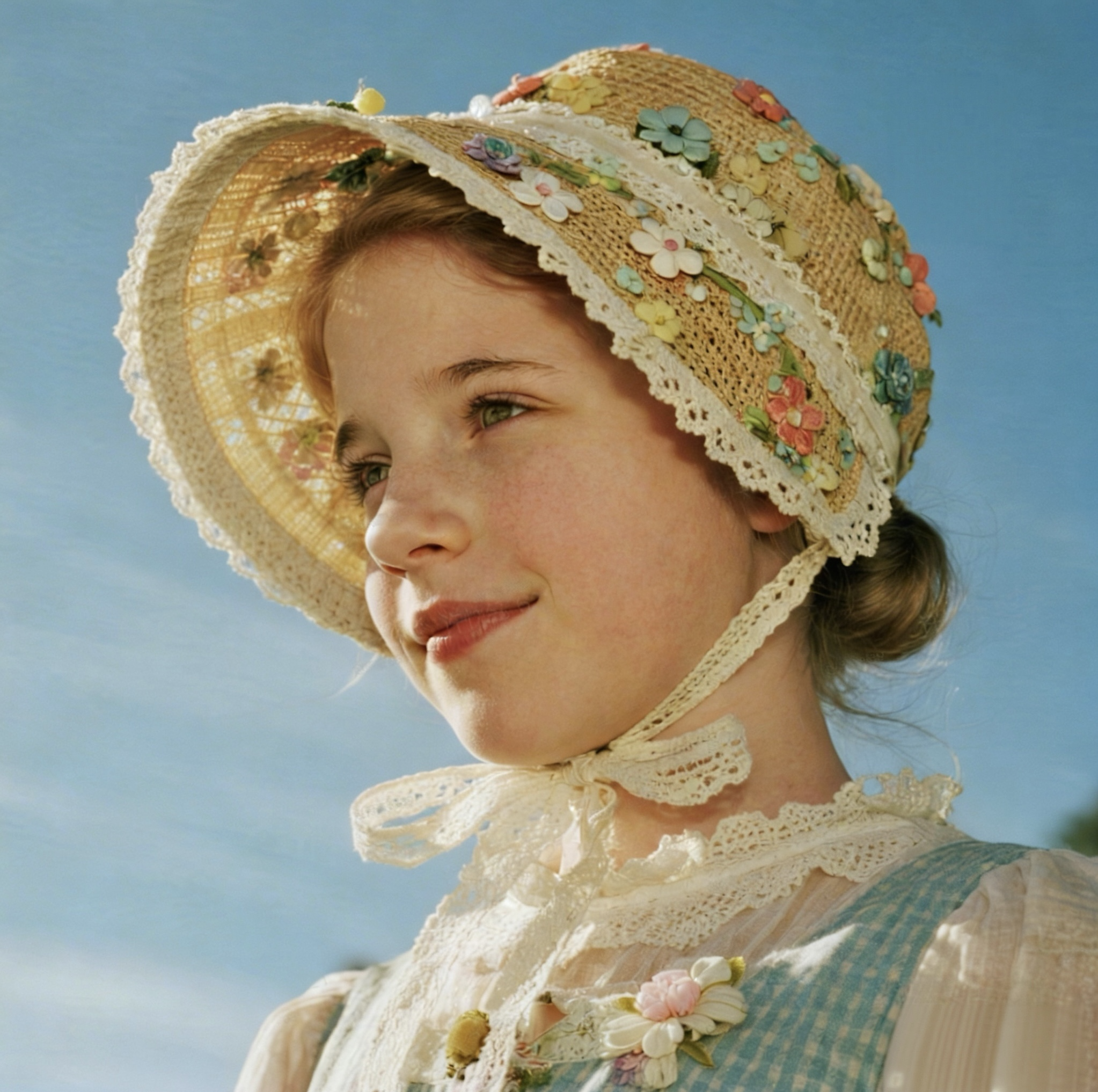 |  |
**Curl**
```Bash
curl https://ark.cn-beijing.volces.com/api/v3/images/generations \
-H "Content-Type: application/json" \
-H "Authorization: Bearer $ARK_API_KEY" \
-d '{
"model": "doubao-seedream-5-0-260128",
"prompt": "将图1的服装换为图2的服装",
"image": ["https://ark-project.tos-cn-beijing.volces.com/doc_image/seedream4_imagesToimage_1.png", "https://ark-project.tos-cn-beijing.volces.com/doc_image/seedream4_5_imagesToimage_2.png"],
"sequential_image_generation": "disabled",
"size": "2K",
"output_format":"png",
"watermark": false
}'
```
- 您可按需替换 Model ID。Model ID 查询见 [模型列表](https://www.volcengine.com/docs/82379/1330310)。
**Python**
```Python
import os
# Install SDK: pip install 'volcengine-python-sdk[ark]'
from volcenginesdkarkruntime import Ark
client = Ark(
# The base URL for model invocation
base_url="https://ark.cn-beijing.volces.com/api/v3",
# Get API Key:https://console.volcengine.com/ark/region:ark+cn-beijing/apikey
api_key=os.getenv('ARK_API_KEY'),
)
imagesResponse = client.images.generate(
# Replace with Model ID
model="doubao-seedream-5-0-260128",
prompt="将图1的服装换为图2的服装",
image=["https://ark-project.tos-cn-beijing.volces.com/doc_image/seedream4_imagesToimage_1.png", "https://ark-project.tos-cn-beijing.volces.com/doc_image/seedream4_5_imagesToimage_2.png"],
size="2K",
sequential_image_generation="disabled",
output_format="png",
response_format="url",
watermark=False
)
print(imagesResponse.data[0].url)
```
**Java**
```Java
package com.ark.sample;
import com.volcengine.ark.runtime.model.images.generation.*;
import com.volcengine.ark.runtime.service.ArkService;
import okhttp3.ConnectionPool;
import okhttp3.Dispatcher;
import java.util.Arrays;
import java.util.List;
import java.util.concurrent.TimeUnit;
public class ImageGenerationsExample {
public static void main(String[] args) {
String apiKey = System.getenv("ARK_API_KEY");
ConnectionPool connectionPool = new ConnectionPool(5, 1, TimeUnit.SECONDS);
Dispatcher dispatcher = new Dispatcher();
ArkService service = ArkService.builder()
.baseUrl("https://ark.cn-beijing.volces.com/api/v3") // The base URL for model invocation
.dispatcher(dispatcher)
.connectionPool(connectionPool)
.apiKey(apiKey)
.build();
GenerateImagesRequest generateRequest = GenerateImagesRequest.builder()
.model("doubao-seedream-5-0-260128") // Replace with Model ID
.prompt("将图1的服装换为图2的服装")
.image(Arrays.asList(
"https://ark-project.tos-cn-beijing.volces.com/doc_image/seedream4_imagesToimage_1.png",
"https://ark-project.tos-cn-beijing.volces.com/doc_image/seedream4_5_imagesToimage_2.png"
))
.size("2K")
.sequentialImageGeneration("disabled")
.outputFormat("png")
.responseFormat(ResponseFormat.Url)
.stream(false)
.watermark(false)
.build();
ImagesResponse imagesResponse = service.generateImages(generateRequest);
System.out.println(imagesResponse.getData().get(0).getUrl());
service.shutdownExecutor();
}
}
```
**Go**
```Go
package main
import (
"context"
"fmt"
"os"
"github.com/volcengine/volcengine-go-sdk/service/arkruntime"
"github.com/volcengine/volcengine-go-sdk/service/arkruntime/model"
"github.com/volcengine/volcengine-go-sdk/volcengine"
)
func main() {
client := arkruntime.NewClientWithApiKey(
os.Getenv("ARK_API_KEY"),
// The base URL for model invocation
arkruntime.WithBaseUrl("https://ark.cn-beijing.volces.com/api/v3"),
)
ctx := context.Background()
outputFormat := model.OutputFormatPNG
generateReq := model.GenerateImagesRequest{
Model: "doubao-seedream-5-0-260128",
Prompt: "将图1的服装换为图2的服装",
Image: []string{
"https://ark-project.tos-cn-beijing.volces.com/doc_image/seedream4_imagesToimage_1.png",
"https://ark-project.tos-cn-beijing.volces.com/doc_image/seedream4_5_imagesToimage_2.png",
},
Size: volcengine.String("2K"),
OutputFormat: &outputFormat,
ResponseFormat: volcengine.String("url"),
Watermark: volcengine.Bool(false),
}
imagesResponse, err := client.GenerateImages(ctx, generateReq)
if err != nil {
fmt.Printf("generate images error: %v\n", err)
return
}
fmt.Printf("%s\n", *imagesResponse.Data[0].Url)
}
```
**OpenAI**
```Python
import os
from openai import OpenAI
client = OpenAI(
# The base URL for model invocation
base_url="https://ark.cn-beijing.volces.com/api/v3",
# Get API Key:https://console.volcengine.com/ark/region:ark+cn-beijing/apikey
api_key=os.getenv('ARK_API_KEY'),
)
imagesResponse = client.images.generate(
model="doubao-seedream-5-0-260128",
prompt="将图1的服装换为图2的服装",
size="2K",
output_format="png",
response_format="url",
extra_body = {
"image": ["https://ark-project.tos-cn-beijing.volces.com/doc_image/seedream4_imagesToimage_1.png", "https://ark-project.tos-cn-beijing.volces.com/doc_image/seedream4_5_imagesToimage_2.png"],
"watermark": False,
"sequential_image_generation": "disabled",
}
)
print(imagesResponse.data[0].url)
```
### 组图输出(多图输出)
支持通过一张或者多张图片和文字信息,生成漫画分镜、品牌视觉等一组内容关联的图片。
需指定参数 **sequential_image_generation** 为`auto`。
#### 文生组图
| 提示词 | 输出(实际会输出4张图片) |
|---|---|
| 生成一组电影级科幻写实风的4张影视分镜:
场景1为宇航员在空间站维修飞船,空间站外部精密机械结构,深邃星空 + 银河背景,宇航员身穿细节完整的白色宇航服,手持专业维修工具,专注检修飞船外壳,中全景构图,侧逆光勾勒轮廓,冷色调科幻光影,空间站灯光点缀,失重环境,金属质感细腻,画面静谧严谨。
场景2为:突然遇到陨石带袭击,广角史诗镜头,大量大小不一的陨石高速袭来,陨石表面纹理清晰,带燃烧尾焰,动态模糊体现速度感,陨石带压迫感拉满,飞船与空间站在画面一侧,太空黑暗深邃,光影强烈对比,紧张灾难氛围,画面冲击力十足。
场景3为:宇航员紧急躲避,近景动态抓拍,宇航员失重状态下极速侧身躲避,肢体动作张力拉满,伸手抓握固定扶手,背景陨石飞掠而过,轻微镜头晃动增强临场感,宇航服褶皱、管线细节清晰,急促紧张,冷冽光影,主体突出不杂乱。
场景4为:受伤后惊险逃回飞船,中近景叙事镜头,宇航员宇航服带轻微破损划痕,略显狼狈却坚毅,踉跄冲向开启的飞船舱门,舱内暖光与太空冷光形成对比,背景陨石逐渐远去,惊险逃生氛围,细节真实,情绪饱满。 | 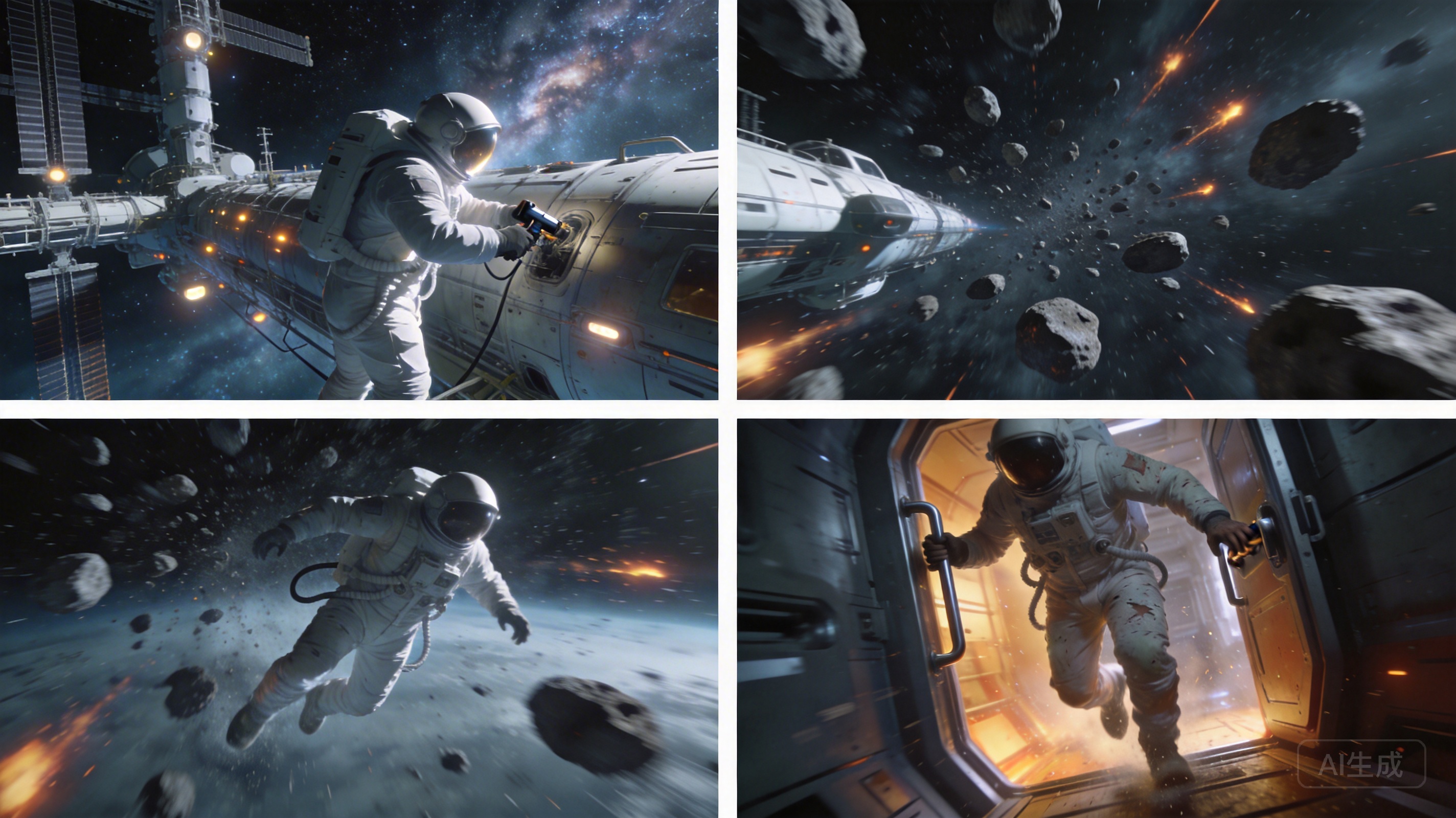 |
**Curl**
```Bash
curl https://ark.cn-beijing.volces.com/api/v3/images/generations \
-H "Content-Type: application/json" \
-H "Authorization: Bearer $ARK_API_KEY" \
-d '{
"model": "doubao-seedream-5-0-260128",
"prompt": "生成一组电影级科幻写实风的4张影视分镜:场景1为宇航员在空间站维修飞船,空间站外部精密机械结构,深邃星空 + 银河背景,宇航员身穿细节完整的白色宇航服,手持专业维修工具,专注检修飞船外壳,中全景构图,侧逆光勾勒轮廓,冷色调科幻光影,空间站灯光点缀,失重环境,金属质感细腻,画面静谧严谨。场景2为:突然遇到陨石带袭击,广角史诗镜头,大量大小不一的陨石高速袭来,陨石表面纹理清晰,带燃烧尾焰,动态模糊体现速度感,陨石带压迫感拉满,飞船与空间站在画面一侧,太空黑暗深邃,光影强烈对比,紧张灾难氛围,画面冲击力十足。场景3为:宇航员紧急躲避,近景动态抓拍,宇航员失重状态下极速侧身躲避,肢体动作张力拉满,伸手抓握固定扶手,背景陨石飞掠而过,轻微镜头晃动增强临场感,宇航服褶皱、管线细节清晰,急促紧张,冷冽光影,主体突出不杂乱。场景4为:受伤后惊险逃回飞船,中近景叙事镜头,宇航员宇航服带轻微破损划痕,略显狼狈却坚毅,踉跄冲向开启的飞船舱门,舱内暖光与太空冷光形成对比,背景陨石逐渐远去,惊险逃生氛围,细节真实,情绪饱满。",
"size": "2K",
"sequential_image_generation": "auto",
"sequential_image_generation_options": {
"max_images": 4
},
"stream": false,
"output_format":"png",
"response_format": "url",
"watermark": false
}'
```
- 您可按需替换 Model ID。Model ID 查询见 [模型列表](https://www.volcengine.com/docs/82379/1330310)。
**Python**
```Python
import os
# Install SDK: pip install 'volcengine-python-sdk[ark]'
from volcenginesdkarkruntime import Ark
from volcenginesdkarkruntime.types.images.images import SequentialImageGenerationOptions
client = Ark(
# The base URL for model invocation .
base_url="https://ark.cn-beijing.volces.com/api/v3",
# Get API Key:https://console.volcengine.com/ark/region:ark+cn-beijing/apikey
api_key=os.getenv('ARK_API_KEY'),
)
imagesResponse = client.images.generate(
# Replace with Model ID
model="doubao-seedream-5-0-260128",
prompt="生成一组电影级科幻写实风的4张影视分镜:场景1为宇航员在空间站维修飞船,空间站外部精密机械结构,深邃星空 + 银河背景,宇航员身穿细节完整的白色宇航服,手持专业维修工具,专注检修飞船外壳,中全景构图,侧逆光勾勒轮廓,冷色调科幻光影,空间站灯光点缀,失重环境,金属质感细腻,画面静谧严谨。场景2为:突然遇到陨石带袭击,广角史诗镜头,大量大小不一的陨石高速袭来,陨石表面纹理清晰,带燃烧尾焰,动态模糊体现速度感,陨石带压迫感拉满,飞船与空间站在画面一侧,太空黑暗深邃,光影强烈对比,紧张灾难氛围,画面冲击力十足。场景3为:宇航员紧急躲避,近景动态抓拍,宇航员失重状态下极速侧身躲避,肢体动作张力拉满,伸手抓握固定扶手,背景陨石飞掠而过,轻微镜头晃动增强临场感,宇航服褶皱、管线细节清晰,急促紧张,冷冽光影,主体突出不杂乱。场景4为:受伤后惊险逃回飞船,中近景叙事镜头,宇航员宇航服带轻微破损划痕,略显狼狈却坚毅,踉跄冲向开启的飞船舱门,舱内暖光与太空冷光形成对比,背景陨石逐渐远去,惊险逃生氛围,细节真实,情绪饱满。",
size="2K",
sequential_image_generation="auto",
sequential_image_generation_options=SequentialImageGenerationOptions(max_images=4),
output_format="png",
response_format="url",
watermark=False
)
# Iterate through all image data
for image in imagesResponse.data:
# Output the current image's URL and size
print(f"URL: {image.url}, Size: {image.size}")
```
**Java**
```Java
package com.ark.sample;
import com.volcengine.ark.runtime.model.images.generation.*;
import com.volcengine.ark.runtime.service.ArkService;
import okhttp3.ConnectionPool;
import okhttp3.Dispatcher;
import java.util.Arrays;
import java.util.List;
import java.util.concurrent.TimeUnit;
public class ImageGenerationsExample {
public static void main(String[] args) {
String apiKey = System.getenv("ARK_API_KEY");
ConnectionPool connectionPool = new ConnectionPool(5, 1, TimeUnit.SECONDS);
Dispatcher dispatcher = new Dispatcher();
ArkService service = ArkService.builder()
.baseUrl("https://ark.cn-beijing.volces.com/api/v3") // The base URL for model invocation
.dispatcher(dispatcher)
.connectionPool(connectionPool)
.apiKey(apiKey)
.build();
GenerateImagesRequest.SequentialImageGenerationOptions sequentialImageGenerationOptions = new GenerateImagesRequest.SequentialImageGenerationOptions();
sequentialImageGenerationOptions.setMaxImages(4);
GenerateImagesRequest generateRequest = GenerateImagesRequest.builder()
.model("doubao-seedream-5-0-260128") // Replace with Model ID
.prompt("生成一组电影级科幻写实风的4张影视分镜:场景1为宇航员在空间站维修飞船,空间站外部精密机械结构,深邃星空 + 银河背景,宇航员身穿细节完整的白色宇航服,手持专业维修工具,专注检修飞船外壳,中全景构图,侧逆光勾勒轮廓,冷色调科幻光影,空间站灯光点缀,失重环境,金属质感细腻,画面静谧严谨。场景2为:突然遇到陨石带袭击,广角史诗镜头,大量大小不一的陨石高速袭来,陨石表面纹理清晰,带燃烧尾焰,动态模糊体现速度感,陨石带压迫感拉满,飞船与空间站在画面一侧,太空黑暗深邃,光影强烈对比,紧张灾难氛围,画面冲击力十足。场景3为:宇航员紧急躲避,近景动态抓拍,宇航员失重状态下极速侧身躲避,肢体动作张力拉满,伸手抓握固定扶手,背景陨石飞掠而过,轻微镜头晃动增强临场感,宇航服褶皱、管线细节清晰,急促紧张,冷冽光影,主体突出不杂乱。场景4为:受伤后惊险逃回飞船,中近景叙事镜头,宇航员宇航服带轻微破损划痕,略显狼狈却坚毅,踉跄冲向开启的飞船舱门,舱内暖光与太空冷光形成对比,背景陨石逐渐远去,惊险逃生氛围,细节真实,情绪饱满。")
.size("2K")
.sequentialImageGeneration("auto")
.sequentialImageGenerationOptions(sequentialImageGenerationOptions)
.outputFormat("png")
.responseFormat(ResponseFormat.Url)
.stream(false)
.watermark(false)
.build();
ImagesResponse imagesResponse = service.generateImages(generateRequest);
// Iterate through all image data
if (imagesResponse != null && imagesResponse.getData() != null) {
for (int i = 0; i < imagesResponse.getData().size(); i++) {
// Retrieve image information
String url = imagesResponse.getData().get(i).getUrl();
String size = imagesResponse.getData().get(i).getSize();
System.out.printf("Image %d:%n", i + 1);
System.out.printf(" URL: %s%n", url);
System.out.printf(" Size: %s%n", size);
System.out.println();
}
service.shutdownExecutor();
}
}
}
```
**Go**
```Go
package main
import (
"context"
"fmt"
"os"
"github.com/volcengine/volcengine-go-sdk/service/arkruntime"
"github.com/volcengine/volcengine-go-sdk/service/arkruntime/model"
"github.com/volcengine/volcengine-go-sdk/volcengine"
)
func main() {
client := arkruntime.NewClientWithApiKey(
os.Getenv("ARK_API_KEY"),
// The base URL for model invocation
arkruntime.WithBaseUrl("https://ark.cn-beijing.volces.com/api/v3"),
)
ctx := context.Background()
outputFormat := model.OutputFormatPNG
var sequentialImageGeneration model.SequentialImageGeneration = "auto"
maxImages := 4
generateReq := model.GenerateImagesRequest{
Model: "doubao-seedream-5-0-260128",
Prompt: "生成一组电影级科幻写实风的4张影视分镜:场景1为宇航员在空间站维修飞船,空间站外部精密机械结构,深邃星空 + 银河背景,宇航员身穿细节完整的白色宇航服,手持专业维修工具,专注检修飞船外壳,中全景构图,侧逆光勾勒轮廓,冷色调科幻光影,空间站灯光点缀,失重环境,金属质感细腻,画面静谧严谨。场景2为:突然遇到陨石带袭击,广角史诗镜头,大量大小不一的陨石高速袭来,陨石表面纹理清晰,带燃烧尾焰,动态模糊体现速度感,陨石带压迫感拉满,飞船与空间站在画面一侧,太空黑暗深邃,光影强烈对比,紧张灾难氛围,画面冲击力十足。场景3为:宇航员紧急躲避,近景动态抓拍,宇航员失重状态下极速侧身躲避,肢体动作张力拉满,伸手抓握固定扶手,背景陨石飞掠而过,轻微镜头晃动增强临场感,宇航服褶皱、管线细节清晰,急促紧张,冷冽光影,主体突出不杂乱。场景4为:受伤后惊险逃回飞船,中近景叙事镜头,宇航员宇航服带轻微破损划痕,略显狼狈却坚毅,踉跄冲向开启的飞船舱门,舱内暖光与太空冷光形成对比,背景陨石逐渐远去,惊险逃生氛围,细节真实,情绪饱满。",
Size: volcengine.String("2K"),
OutputFormat: &outputFormat,
ResponseFormat: volcengine.String("url"),
Watermark: volcengine.Bool(false),
SequentialImageGeneration: &sequentialImageGeneration,
SequentialImageGenerationOptions: &model.SequentialImageGenerationOptions{
MaxImages: &maxImages,
},
}
resp, err := client.GenerateImages(ctx, generateReq)
if err != nil {
fmt.Printf("call GenerateImages error: %v\n", err)
return
}
if resp.Error != nil {
fmt.Printf("API returned error: %s - %s\n", resp.Error.Code, resp.Error.Message)
return
}
// Output the generated image information
fmt.Printf("Generated %d images:\n", len(resp.Data))
for i, image := range resp.Data {
var url string
if image.Url != nil {
url = *image.Url
} else {
url = "N/A"
}
fmt.Printf("Image %d: Size: %s, URL: %s\n", i+1, image.Size, url)
}
}
```
**OpenAI**
```Python
import os
from openai import OpenAI
client = OpenAI(
# The base URL for model invocation .
base_url="https://ark.cn-beijing.volces.com/api/v3",
# Get API Key:https://console.volcengine.com/ark/region:ark+cn-beijing/apikey
api_key=os.getenv('ARK_API_KEY'),
)
imagesResponse = client.images.generate(
model="doubao-seedream-5-0-260128",
prompt="生成一组电影级科幻写实风的4张影视分镜:场景1为宇航员在空间站维修飞船,空间站外部精密机械结构,深邃星空 + 银河背景,宇航员身穿细节完整的白色宇航服,手持专业维修工具,专注检修飞船外壳,中全景构图,侧逆光勾勒轮廓,冷色调科幻光影,空间站灯光点缀,失重环境,金属质感细腻,画面静谧严谨。场景2为:突然遇到陨石带袭击,广角史诗镜头,大量大小不一的陨石高速袭来,陨石表面纹理清晰,带燃烧尾焰,动态模糊体现速度感,陨石带压迫感拉满,飞船与空间站在画面一侧,太空黑暗深邃,光影强烈对比,紧张灾难氛围,画面冲击力十足。场景3为:宇航员紧急躲避,近景动态抓拍,宇航员失重状态下极速侧身躲避,肢体动作张力拉满,伸手抓握固定扶手,背景陨石飞掠而过,轻微镜头晃动增强临场感,宇航服褶皱、管线细节清晰,急促紧张,冷冽光影,主体突出不杂乱。场景4为:受伤后惊险逃回飞船,中近景叙事镜头,宇航员宇航服带轻微破损划痕,略显狼狈却坚毅,踉跄冲向开启的飞船舱门,舱内暖光与太空冷光形成对比,背景陨石逐渐远去,惊险逃生氛围,细节真实,情绪饱满。",
size="2K",
output_format="png",
response_format="url",
extra_body={
"watermark": False,
"sequential_image_generation": "auto",
"sequential_image_generation_options": {
"max_images": 4
},
},
)
# Iterate through all image data
for image in imagesResponse.data:
# Output the current image's URL and size
print(f"URL: {image.url}, Size: {image.size}")
```
#### 单张图生组图
| 提示词 | 输入图 | 输出(实际会输出4张图片) |
|---|---|---|
| 参考这个LOGO,做一套户外运动品牌视觉设计,品牌名称为“GREEN”,包括包装袋、帽子、卡片、挂绳等。绿色视觉主色调,趣味、简约现代风格。 |  | 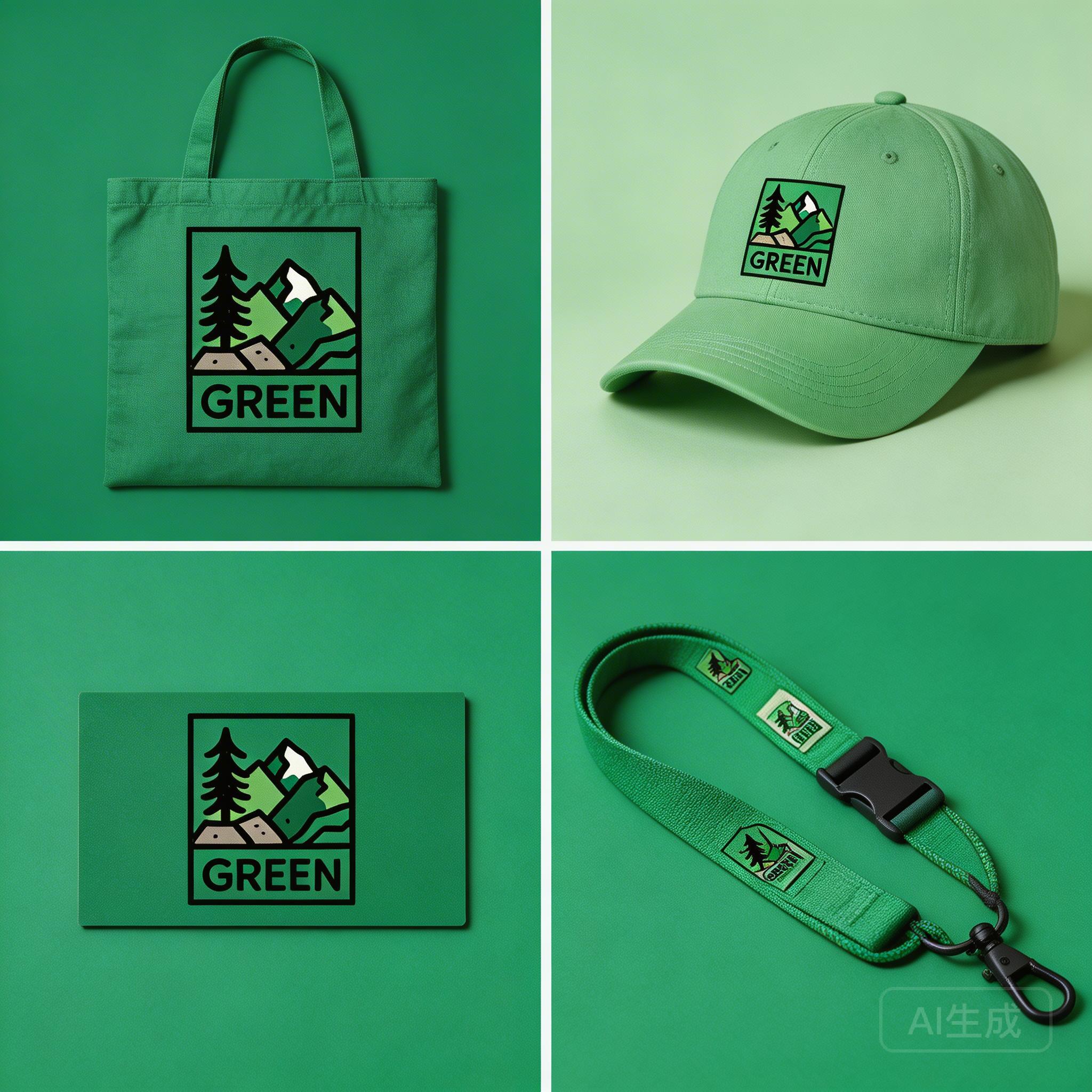 |
**Curl**
```Bash
curl https://ark.cn-beijing.volces.com/api/v3/images/generations \
-H "Content-Type: application/json" \
-H "Authorization: Bearer $ARK_API_KEY" \
-d '{
"model": "doubao-seedream-5-0-260128",
"prompt": "参考这个LOGO,做一套户外运动品牌视觉设计,品牌名称为“GREEN",包括包装袋、帽子、卡片、挂绳等。绿色视觉主色调,趣味、简约现代风格",
"image": "https://ark-project.tos-cn-beijing.volces.com/doc_image/seedream4_imageToimages.png",
"size": "2K",
"sequential_image_generation": "auto",
"sequential_image_generation_options": {
"max_images": 4
},
"stream": false,
"output_format":"png",
"response_format": "url",
"watermark": false
}'
```
- 您可按需替换 Model ID。Model ID 查询见 [模型列表](https://www.volcengine.com/docs/82379/1330310)。
**Python**
```Python
import os
# Install SDK: pip install 'volcengine-python-sdk[ark]' .
from volcenginesdkarkruntime import Ark
from volcenginesdkarkruntime.types.images.images import SequentialImageGenerationOptions
client = Ark(
# The base URL for model invocation .
base_url="https://ark.cn-beijing.volces.com/api/v3",
# Get API Key:https://console.volcengine.com/ark/region:ark+cn-beijing/apikey
api_key=os.getenv('ARK_API_KEY'),
)
imagesResponse = client.images.generate(
# Replace with Model ID .
model="doubao-seedream-5-0-260128",
prompt="参考这个LOGO,做一套户外运动品牌视觉设计,品牌名称为“GREEN",包括包装袋、帽子、卡片、挂绳等。绿色视觉主色调,趣味、简约现代风格",
image="https://ark-project.tos-cn-beijing.volces.com/doc_image/seedream4_imageToimages.png",
size="2K",
sequential_image_generation="auto",
sequential_image_generation_options=SequentialImageGenerationOptions(max_images=4),
output_format="png",
response_format="url",
watermark=False
)
# Iterate through all image data
for image in imagesResponse.data:
# Output the current image's URL and size
print(f"URL: {image.url}, Size: {image.size}")
```
**Java**
```Java
package com.ark.sample;
import com.volcengine.ark.runtime.model.images.generation.*;
import com.volcengine.ark.runtime.service.ArkService;
import okhttp3.ConnectionPool;
import okhttp3.Dispatcher;
import java.util.Arrays;
import java.util.List;
import java.util.concurrent.TimeUnit;
public class ImageGenerationsExample {
public static void main(String[] args) {
String apiKey = System.getenv("ARK_API_KEY");
ConnectionPool connectionPool = new ConnectionPool(5, 1, TimeUnit.SECONDS);
Dispatcher dispatcher = new Dispatcher();
ArkService service = ArkService.builder()
.baseUrl("https://ark.cn-beijing.volces.com/api/v3") // The base URL for model invocation
.dispatcher(dispatcher)
.connectionPool(connectionPool)
.apiKey(apiKey)
.build();
GenerateImagesRequest.SequentialImageGenerationOptions sequentialImageGenerationOptions = new GenerateImagesRequest.SequentialImageGenerationOptions();
sequentialImageGenerationOptions.setMaxImages(4);
GenerateImagesRequest generateRequest = GenerateImagesRequest.builder()
.model("doubao-seedream-5-0-260128") // Replace with Model ID
.prompt("参考这个LOGO,做一套户外运动品牌视觉设计,品牌名称为“GREEN",包括包装袋、帽子、卡片、挂绳等。绿色视觉主色调,趣味、简约现代风格")
.image("https://ark-project.tos-cn-beijing.volces.com/doc_image/seedream4_imageToimages.png")
.size("2K")
.sequentialImageGeneration("auto")
.sequentialImageGenerationOptions(sequentialImageGenerationOptions)
.outputFormat("png")
.responseFormat(ResponseFormat.Url)
.stream(false)
.watermark(false)
.build();
ImagesResponse imagesResponse = service.generateImages(generateRequest);
// Iterate through all image data
if (imagesResponse != null && imagesResponse.getData() != null) {
for (int i = 0; i < imagesResponse.getData().size(); i++) {
// Retrieve image information
String url = imagesResponse.getData().get(i).getUrl();
String size = imagesResponse.getData().get(i).getSize();
System.out.printf("Image %d:%n", i + 1);
System.out.printf(" URL: %s%n", url);
System.out.printf(" Size: %s%n", size);
System.out.println();
}
service.shutdownExecutor();
}
}
}
```
**Go**
```Go
package main
import (
"context"
"fmt"
"os"
"github.com/volcengine/volcengine-go-sdk/service/arkruntime"
"github.com/volcengine/volcengine-go-sdk/service/arkruntime/model"
"github.com/volcengine/volcengine-go-sdk/volcengine"
)
func main() {
client := arkruntime.NewClientWithApiKey(
os.Getenv("ARK_API_KEY"),
// The base URL for model invocation
arkruntime.WithBaseUrl("https://ark.cn-beijing.volces.com/api/v3"),
)
ctx := context.Background()
outputFormat := model.OutputFormatPNG
var sequentialImageGeneration model.SequentialImageGeneration = "auto"
maxImages := 4
generateReq := model.GenerateImagesRequest{
Model: "doubao-seedream-5-0-260128",
Prompt: "参考这个LOGO,做一套户外运动品牌视觉设计,品牌名称为“GREEN",包括包装袋、帽子、卡片、挂绳等。绿色视觉主色调,趣味、简约现代风格",
Image: volcengine.String("https://ark-project.tos-cn-beijing.volces.com/doc_image/seedream4_imageToimages.png"),
Size: volcengine.String("2K"),
OutputFormat: &outputFormat,
ResponseFormat: volcengine.String("url"),
Watermark: volcengine.Bool(false),
SequentialImageGeneration: &sequentialImageGeneration,
SequentialImageGenerationOptions: &model.SequentialImageGenerationOptions{
MaxImages: &maxImages,
},
}
resp, err := client.GenerateImages(ctx, generateReq)
if err != nil {
fmt.Printf("call GenerateImages error: %v\n", err)
return
}
if resp.Error != nil {
fmt.Printf("API returned error: %s - %s\n", resp.Error.Code, resp.Error.Message)
return
}
// Output the generated image information
fmt.Printf("Generated %d images:\n", len(resp.Data))
for i, image := range resp.Data {
var url string
if image.Url != nil {
url = *image.Url
} else {
url = "N/A"
}
fmt.Printf("Image %d: Size: %s, URL: %s\n", i+1, image.Size, url)
}
}
```
- 您可按需替换 Model ID。Model ID 查询见 [模型列表](https://www.volcengine.com/docs/82379/1330310)。
**OpenAI**
```Python
import os
from openai import OpenAI
client = OpenAI(
# The base URL for model invocation
base_url="https://ark.cn-beijing.volces.com/api/v3",
# Get API Key:https://console.volcengine.com/ark/region:ark+cn-beijing/apikey
api_key=os.getenv('ARK_API_KEY'),
)
imagesResponse = client.images.generate(
model="doubao-seedream-5-0-260128",
prompt="参考这个LOGO,做一套户外运动品牌视觉设计,品牌名称为“GREEN",包括包装袋、帽子、卡片、挂绳等。绿色视觉主色调,趣味、简约现代风格",
size="2K",
output_format="png",
response_format="url",
extra_body={
"image": "https://ark-project.tos-cn-beijing.volces.com/doc_image/seedream4_imageToimages.png",
"watermark": False,
"sequential_image_generation": "auto",
"sequential_image_generation_options": {
"max_images": 4
},
}
)
# Iterate through all image data
for image in imagesResponse.data:
# Output the current image's URL and size
print(f"URL: {image.url}, Size: {image.size}")
```
#### 多参考图生组图
| 提示词 | 输入图1 | 输入图2 | 输出(实际会输出3张图片) |
|---|---|---|---|
| 生成3张女孩和奶牛玩偶在游乐园开心地坐过山车的图片,涵盖早晨、中午、晚上 | 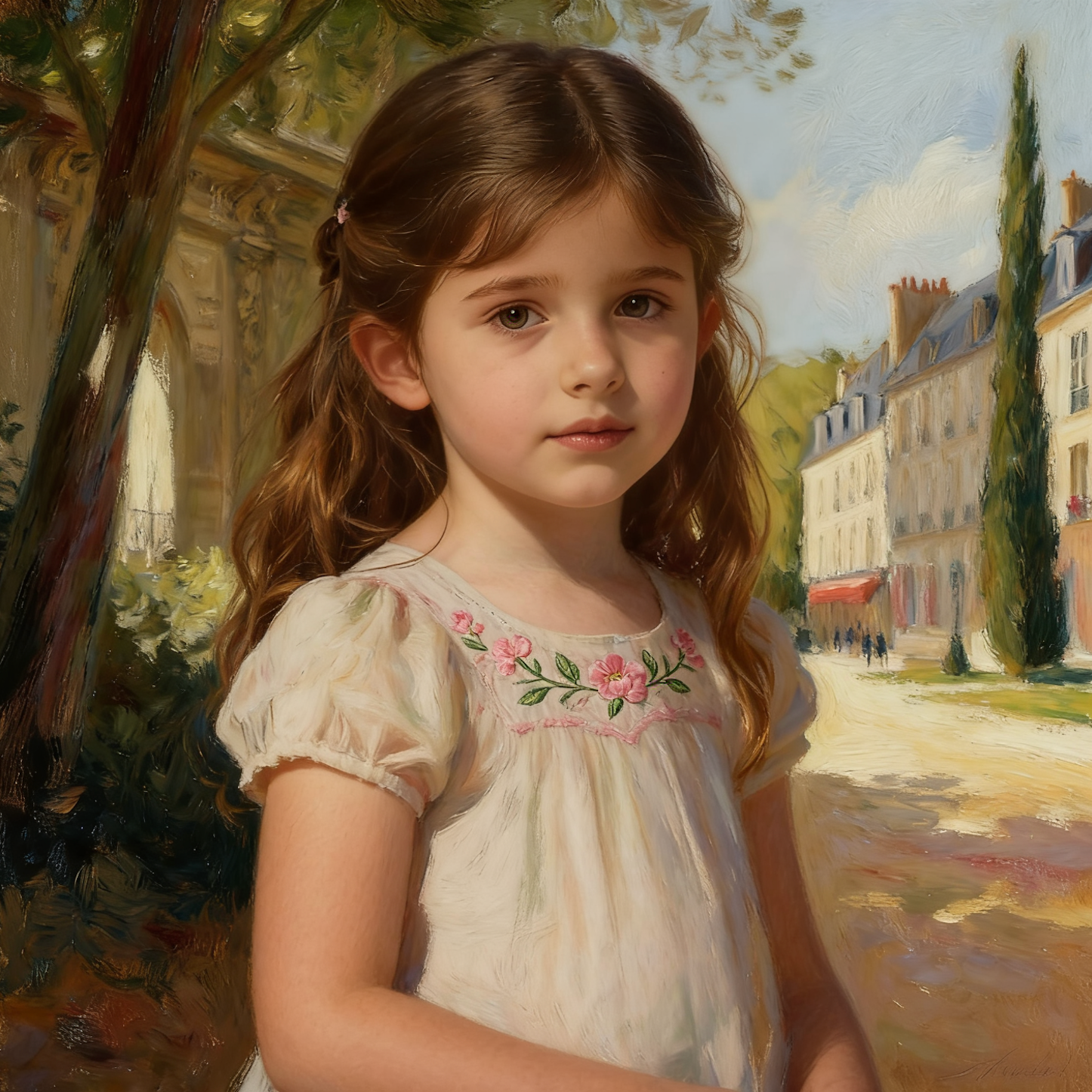 | 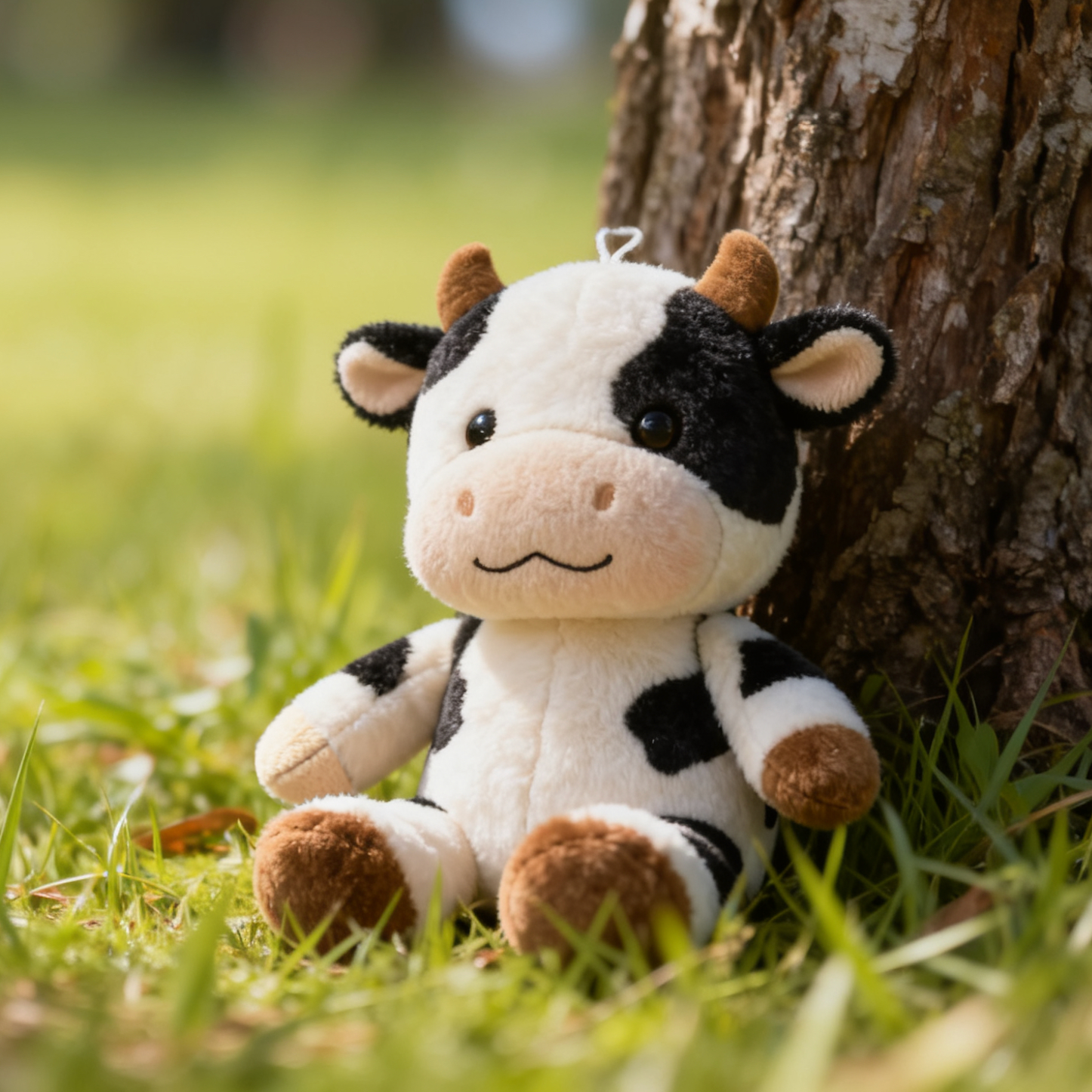 | 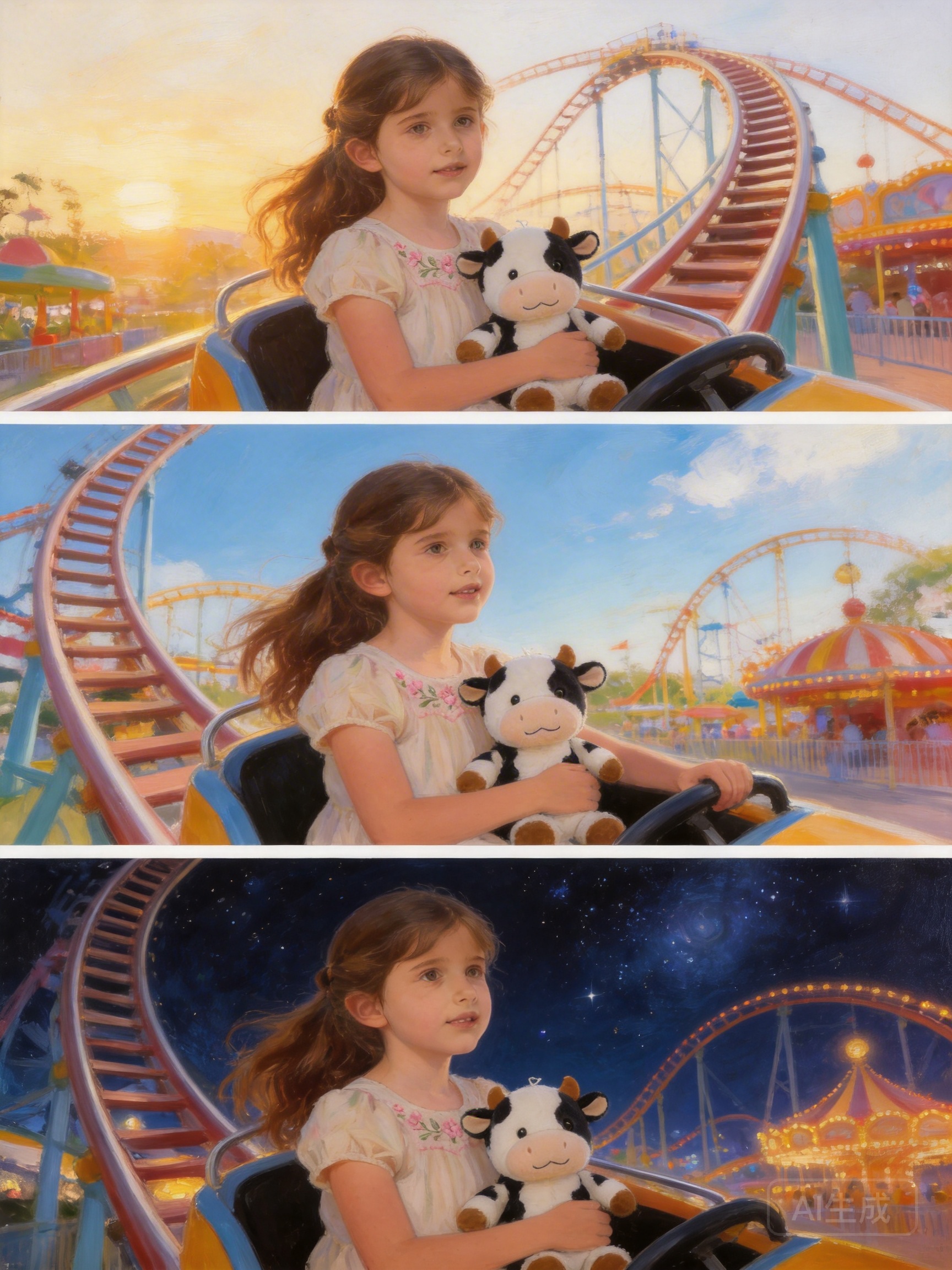 |
**Curl**
```Bash
curl https://ark.cn-beijing.volces.com/api/v3/images/generations \
-H "Content-Type: application/json" \
-H "Authorization: Bearer $ARK_API_KEY" \
-d '{
"model": "doubao-seedream-5-0-260128",
"prompt": "生成3张女孩和奶牛玩偶在游乐园开心地坐过山车的图片,涵盖早晨、中午、晚上",
"image": ["https://ark-project.tos-cn-beijing.volces.com/doc_image/seedream4_imagesToimages_1.png", "https://ark-project.tos-cn-beijing.volces.com/doc_image/seedream4_imagesToimages_2.png"],
"sequential_image_generation": "auto",
"sequential_image_generation_options": {
"max_images": 3
},
"size": "2K",
"output_format":"png",
"watermark": false
}'
```
- 您可按需替换 Model ID。Model ID 查询见 [模型列表](https://www.volcengine.com/docs/82379/1330310)。
**Python**
```Python
import os
# Install SDK: pip install 'volcengine-python-sdk[ark]' .
from volcenginesdkarkruntime import Ark
from volcenginesdkarkruntime.types.images.images import SequentialImageGenerationOptions
client = Ark(
# The base URL for model invocation
base_url="https://ark.cn-beijing.volces.com/api/v3",
# Get API Key:https://console.volcengine.com/ark/region:ark+cn-beijing/apikey
api_key=os.getenv('ARK_API_KEY'),
)
imagesResponse = client.images.generate(
# Replace with Model ID
model="doubao-seedream-5-0-260128",
prompt="生成3张女孩和奶牛玩偶在游乐园开心地坐过山车的图片,涵盖早晨、中午、晚上",
image=["https://ark-project.tos-cn-beijing.volces.com/doc_image/seedream4_imagesToimages_1.png", "https://ark-project.tos-cn-beijing.volces.com/doc_image/seedream4_imagesToimages_2.png"],
size="2K",
sequential_image_generation="auto",
sequential_image_generation_options=SequentialImageGenerationOptions(max_images=3),
output_format="png",
response_format="url",
watermark=False
)
# Iterate through all image data
for image in imagesResponse.data:
# Output the current image's URL and size
print(f"URL: {image.url}, Size: {image.size}")
```
**Java**
```Java
package com.ark.sample;
import com.volcengine.ark.runtime.model.images.generation.*;
import com.volcengine.ark.runtime.service.ArkService;
import okhttp3.ConnectionPool;
import okhttp3.Dispatcher;
import java.util.Arrays;
import java.util.List;
import java.util.concurrent.TimeUnit;
public class ImageGenerationsExample {
public static void main(String[] args) {
String apiKey = System.getenv("ARK_API_KEY");
ConnectionPool connectionPool = new ConnectionPool(5, 1, TimeUnit.SECONDS);
Dispatcher dispatcher = new Dispatcher();
ArkService service = ArkService.builder()
.baseUrl("https://ark.cn-beijing.volces.com/api/v3") // The base URL for model invocation
.dispatcher(dispatcher)
.connectionPool(connectionPool)
.apiKey(apiKey)
.build();
GenerateImagesRequest.SequentialImageGenerationOptions sequentialImageGenerationOptions = new GenerateImagesRequest.SequentialImageGenerationOptions();
sequentialImageGenerationOptions.setMaxImages(3);
GenerateImagesRequest generateRequest = GenerateImagesRequest.builder()
.model("doubao-seedream-5-0-260128") // Replace with Model ID
.prompt("生成3张女孩和奶牛玩偶在游乐园开心地坐过山车的图片,涵盖早晨、中午、晚上")
.image(Arrays.asList(
"https://ark-project.tos-cn-beijing.volces.com/doc_image/seedream4_imagesToimages_1.png",
"https://ark-project.tos-cn-beijing.volces.com/doc_image/seedream4_imagesToimages_2.png"
))
.outputFormat("png")
.size("2K")
.sequentialImageGeneration("auto")
.sequentialImageGenerationOptions(sequentialImageGenerationOptions)
.responseFormat(ResponseFormat.Url)
.stream(false)
.watermark(false)
.build();
ImagesResponse imagesResponse = service.generateImages(generateRequest);
// Iterate through all image data
if (imagesResponse != null && imagesResponse.getData() != null) {
for (int i = 0; i < imagesResponse.getData().size(); i++) {
// Retrieve image information
String url = imagesResponse.getData().get(i).getUrl();
String size = imagesResponse.getData().get(i).getSize();
System.out.printf("Image %d:%n", i + 1);
System.out.printf(" URL: %s%n", url);
System.out.printf(" Size: %s%n", size);
System.out.println();
}
service.shutdownExecutor();
}
}
}
```
**Go**
```Go
package main
import (
"context"
"fmt"
"os"
"github.com/volcengine/volcengine-go-sdk/service/arkruntime"
"github.com/volcengine/volcengine-go-sdk/service/arkruntime/model"
"github.com/volcengine/volcengine-go-sdk/volcengine"
)
func main() {
client := arkruntime.NewClientWithApiKey(
os.Getenv("ARK_API_KEY"),
// The base URL for model invocation
arkruntime.WithBaseUrl("https://ark.cn-beijing.volces.com/api/v3"),
)
ctx := context.Background()
outputFormat := model.OutputFormatPNG
var sequentialImageGeneration model.SequentialImageGeneration = "auto"
maxImages := 3
generateReq := model.GenerateImagesRequest{
Model: "doubao-seedream-5-0-260128",
Prompt: "生成3张女孩和奶牛玩偶在游乐园开心地坐过山车的图片,涵盖早晨、中午、晚上",
Image: []string{
"https://ark-project.tos-cn-beijing.volces.com/doc_image/seedream4_imagesToimages_1.png",
"https://ark-project.tos-cn-beijing.volces.com/doc_image/seedream4_imagesToimages_2.png",
},
Size: volcengine.String("2K"),
OutputFormat: &outputFormat,
ResponseFormat: volcengine.String("url"),
Watermark: volcengine.Bool(false),
SequentialImageGeneration: &sequentialImageGeneration,
SequentialImageGenerationOptions: &model.SequentialImageGenerationOptions{
MaxImages: &maxImages,
},
}
resp, err := client.GenerateImages(ctx, generateReq)
if err != nil {
fmt.Printf("call GenerateImages error: %v\n", err)
return
}
if resp.Error != nil {
fmt.Printf("API returned error: %s - %s\n", resp.Error.Code, resp.Error.Message)
return
}
// Output the generated image information
fmt.Printf("Generated %d images:\n", len(resp.Data))
for i, image := range resp.Data {
var url string
if image.Url != nil {
url = *image.Url
} else {
url = "N/A"
}
fmt.Printf("Image %d: Size: %s, URL: %s\n", i+1, image.Size, url)
}
}
```
**OpenAI**
```Python
import os
from openai import OpenAI
client = OpenAI(
# The base URL for model invocation
base_url="https://ark.cn-beijing.volces.com/api/v3",
# Get API Key:https://console.volcengine.com/ark/region:ark+cn-beijing/apikey
api_key=os.getenv('ARK_API_KEY'),
)
imagesResponse = client.images.generate(
model="doubao-seedream-5-0-260128",
prompt="生成3张女孩和奶牛玩偶在游乐园开心地坐过山车的图片,涵盖早晨、中午、晚上",
size="2K",
output_format="png",
response_format="url",
extra_body={
"image": ["https://ark-project.tos-cn-beijing.volces.com/doc_image/seedream4_imagesToimages_1.png", "https://ark-project.tos-cn-beijing.volces.com/doc_image/seedream4_imagesToimages_2.png"],
"watermark": False,
"sequential_image_generation": "auto",
"sequential_image_generation_options": {
"max_images": 3
},
}
)
# Iterate through all image data
for image in imagesResponse.data:
# Output the current image's URL and size
print(f"URL: {image.url}, Size: {image.size}")
```
## 提示词建议
- 建议用**简洁连贯**的自然语言写明 **主体 + 行为 + 环境**,若对画面美学有要求,可用自然语言或短语补充 **风格**、**色彩**、**光影**、**构图** 等美学元素。详情可参见 [Seedream 4.0-5.0 提示词指南](https://www.volcengine.com/docs/82379/1829186)。
- 文本提示词(prompt)建议不超过300个汉字或600个英文单词。字数过多信息容易分散,模型可能因此忽略细节,只关注重点,造成图片缺失部分元素。
# 进阶使用
## 联网搜索
Doubao Seedream 5.0 lite 新增支持调用联网搜索工具,通过配置 tools.**type** 参数为 `web_search` 即可开启联网搜索。
- 开启联网搜索后,模型会根据用户的提示词自主判断是否搜索互联网内容(如商品、天气等),提升生成图片的时效性,但也会增加一定的时延。
- 实际搜索次数可通过字段 usage.tool_usage.**web_search** 查询,如果为 **0** 表示未搜索。
| 提示词 | 输出 |
|---|---|
| 制作一张上海未来5日的天气预报图,采用现代扁平化插画风格,清晰展示每日天气、温度和穿搭建议。整体为横向排版,标题为“上海未来5日天气预报”,包含5个等宽的垂直卡片,从左到右依次排列。整体风格为现代、干净、友好的扁平化矢量插画风格,线条清晰,色彩柔和。人物形象采用年轻男女的卡通插画,表情自然,姿态放松,服装细节清晰。 |  |
**Curl**
```Bash
curl https://ark.cn-beijing.volces.com/api/v3/images/generations \
-H "Content-Type: application/json" \
-H "Authorization: Bearer $ARK_API_KEY" \
-d '{
"model": "doubao-seedream-5-0-260128",
"prompt": "制作一张上海未来5日的天气预报图,采用现代扁平化插画风格,清晰展示每日天气、温度和穿搭建议。整体为横向排版,标题为“上海未来5日天气预报”,包含5个等宽的垂直卡片,从左到右依次排列。 整体风格为现代、干净、友好的扁平化矢量插画风格,线条清晰,色彩柔和。人物形象采用年轻男女的卡通插画,表情自然,姿态放松,服装细节清晰。",
"size": "2048x2048",
"tools": [
{
"type": "web_search"
}
],
"output_format":"png",
"response_format": "url",
"watermark": false
}'
```
- 您可按需替换 Model ID。Model ID 查询见 [模型列表](https://www.volcengine.com/docs/82379/1330310)。
**Python**
```Python
import os
# Install SDK: pip install 'volcengine-python-sdk[ark]' .
from volcenginesdkarkruntime import Ark
from volcenginesdkarkruntime.types.images.images import ContentGenerationTool
client = Ark(
# The base URL for model invocation
base_url="https://ark.cn-beijing.volces.com/api/v3",
# Get API Key:https://console.volcengine.com/ark/region:ark+cn-beijing/apikey
api_key=os.getenv('ARK_API_KEY'),
)
imagesResponse = client.images.generate(
# Replace with Model ID
model="doubao-seedream-5-0-260128",
prompt="制作一张上海未来5日的天气预报图,采用现代扁平化插画风格,清晰展示每日天气、温度和穿搭建议。 整体为横向排版,标题为“上海未来5日天气预报”,包含5个等宽的垂直卡片,从左到右依次排列。 整体风格为现代、干净、友好的扁平化矢量插画风格,线条清晰,色彩柔和。人物形象采用年轻男女的卡通插画,表情自然,姿态放松,服装细节清晰。",
size="2048x2048",
output_format="png",
response_format="url",
tools=[ContentGenerationTool(type="web_search")],
watermark=False,
)
print(imagesResponse.data[0].url)
```
**Java**
```Java
package com.ark.sample;
import com.volcengine.ark.runtime.model.images.generation.*;
import com.volcengine.ark.runtime.service.ArkService;
import okhttp3.ConnectionPool;
import okhttp3.Dispatcher;
import java.util.Arrays;
import java.util.List;
import java.util.concurrent.TimeUnit;
public class ImageGenerationsExample {
public static void main(String[] args) {
// Get API Key:https://console.volcengine.com/ark/region:ark+cn-beijing/apikey
String apiKey = System.getenv("ARK_API_KEY");
ConnectionPool connectionPool = new ConnectionPool(5, 1, TimeUnit.SECONDS);
Dispatcher dispatcher = new Dispatcher();
ArkService service = ArkService.builder()
.baseUrl("https://ark.cn-beijing.volces.com/api/v3") // The base URL for model invocation
.dispatcher(dispatcher)
.connectionPool(connectionPool)
.apiKey(apiKey)
.build();
// Create ContentGenerationTool
GenerateImagesRequest.ContentGenerationTool contentGenerationTool = new GenerateImagesRequest.ContentGenerationTool();
contentGenerationTool.setType("web_search");
// Create list of tools
List tools = Arrays.asList(contentGenerationTool);
GenerateImagesRequest generateRequest = GenerateImagesRequest.builder()
.model("doubao-seedream-5-0-260128") // Replace with Model ID
.prompt("制作一张上海未来5日的天气预报图,采用现代扁平化插画风格,清晰展示每日天气、温度和穿搭建议。 整体为横向排版,标题为“上海未来5日天气预报”,包含5个等宽的垂直卡片,从左到右依次排列。 整体风格为现代、干净、友好的扁平化矢量插画风格,线条清晰,色彩柔和。人物形象采用年轻男女的卡通插画,表情自然,姿态放松,服装细节清晰。")
.size("2048x2048")
.outputFormat("png")
.responseFormat("url")
.watermark(false)
.tools(tools)
.build();
ImagesResponse imagesResponse = service.generateImages(generateRequest);
System.out.println(imagesResponse.getData().get(0).getUrl());
service.shutdownExecutor();
}
}
```
**Go**
```Go
package main
import (
"context"
"fmt"
"os"
"github.com/volcengine/volcengine-go-sdk/service/arkruntime"
"github.com/volcengine/volcengine-go-sdk/service/arkruntime/model"
"github.com/volcengine/volcengine-go-sdk/volcengine"
)
func main() {
client := arkruntime.NewClientWithApiKey(
// Get API Key:https://console.volcengine.com/ark/region:ark+cn-beijing/apikey
os.Getenv("ARK_API_KEY"),
// The base URL for model invocation
arkruntime.WithBaseUrl("https://ark.cn-beijing.volces.com/api/v3"),
)
ctx := context.Background()
outputFormat := model.OutputFormatPNG
generateReq := model.GenerateImagesRequest{
Model: "doubao-seedream-5-0-260128", // Replace with Model ID
Prompt: "制作一张上海未来5日的天气预报图,采用现代扁平化插画风格,清晰展示每日天气、温度和穿搭建议。 整体为横向排版,标题为“上海未来5日天气预报”,包含5个等宽的垂直卡片,从左到右依次排列。 整体风格为现代、干净、友好的扁平化矢量插画风格,线条清晰,色彩柔和。人物形象采用年轻男女的卡通插画,表情自然,姿态放松,服装细节清晰。",
Size: volcengine.String("2048x2048"),
OutputFormat: &outputFormat,
ResponseFormat: volcengine.String("url"),
Watermark: volcengine.Bool(false),
Tools: []*model.ContentGenerationTool{
{
Type: model.ToolTypeWebSearch,
},
},
}
imagesResponse, err := client.GenerateImages(ctx, generateReq)
if err != nil {
fmt.Printf("generate images error: %v\n", err)
return
}
fmt.Printf("%s\n", *imagesResponse.Data[0].Url)
}
```
## 流式输出
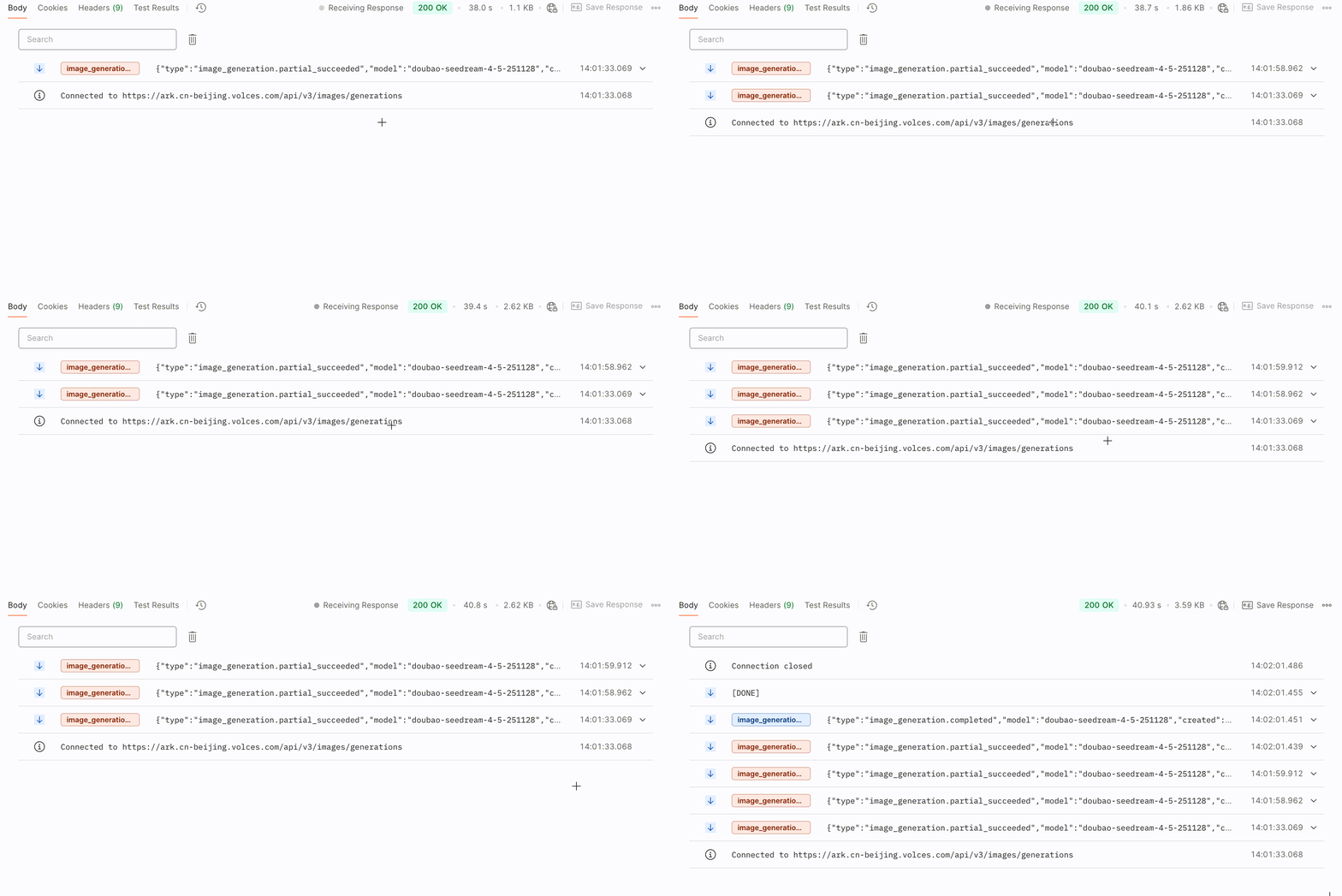
模型支持流式图像生成,当生成完任一图片后即返回结果,让您能更快浏览到生成的图像,改善等待体验。
通过配置 **stream** 参数为`true`,即可开启流式输出模式。
**Curl**
```Bash
curl https://ark.cn-beijing.volces.com/api/v3/images/generations \
-H "Content-Type: application/json" \
-H "Authorization: Bearer $ARK_API_KEY" \
-d '{
"model": "doubao-seedream-5-0-260128",
"prompt": "参考图1,生成四图片,图中人物分别带着墨镜,骑着摩托,带着帽子,拿着棒棒糖",
"image": "https://ark-project.tos-cn-beijing.volces.com/doc_image/seedream4_imageToimages_1.png",
"sequential_image_generation": "auto",
"sequential_image_generation_options": {
"max_images": 4
},
"size": "2K",
"stream": true,
"output_format":"png",
"watermark": false
}'
```
- 您可按需替换 Model ID。Model ID 查询见 [模型列表](https://www.volcengine.com/docs/82379/1330310)。
**Python**
```Python
import os
# Install SDK: pip install 'volcengine-python-sdk[ark]'
from volcenginesdkarkruntime import Ark
from volcenginesdkarkruntime.types.images.images import SequentialImageGenerationOptions
client = Ark(
# The base URL for model invocation
base_url="https://ark.cn-beijing.volces.com/api/v3",
# Get API Key:https://console.volcengine.com/ark/region:ark+cn-beijing/apikey
api_key=os.getenv('ARK_API_KEY'),
)
if __name__ == "__main__":
stream = client.images.generate(
# Replace with Model ID
model="doubao-seedream-5-0-260128",
prompt="参考图1,生成四图片,图中人物分别带着墨镜,骑着摩托,带着帽子,拿着棒棒糖",
image="https://ark-project.tos-cn-beijing.volces.com/doc_image/seedream4_imageToimages_1.png",
size="2K",
sequential_image_generation="auto",
sequential_image_generation_options=SequentialImageGenerationOptions(max_images=4),
output_format="png",
response_format="url",
stream=True,
watermark=False
)
for event in stream:
if event is None:
continue
if event.type == "image_generation.partial_failed":
print(f"Stream generate images error: {event.error}")
if event.error is not None and event.error.code.equal("InternalServiceError"):
break
elif event.type == "image_generation.partial_succeeded":
if event.error is None and event.url:
print(f"recv.Size: {event.size}, recv.Url: {event.url}")
elif event.type == "image_generation.completed":
if event.error is None:
print("Final completed event:")
print("recv.Usage:", event.usage)
elif event.type == "image_generation.partial_image":
print(f"Partial image index={event.partial_image_index}, size={len(event.b64_json)}")
```
**Java**
```Java
package com.ark.sample;
import com.volcengine.ark.runtime.model.images.generation.*;
import com.volcengine.ark.runtime.service.ArkService;
import okhttp3.ConnectionPool;
import okhttp3.Dispatcher;
import java.util.Arrays;
import java.util.List;
import java.util.concurrent.TimeUnit;
public class ImageGenerationsExample {
public static void main(String[] args) {
String apiKey = System.getenv("ARK_API_KEY");
ConnectionPool connectionPool = new ConnectionPool(5, 1, TimeUnit.SECONDS);
Dispatcher dispatcher = new Dispatcher();
ArkService service = ArkService.builder()
.baseUrl("https://ark.cn-beijing.volces.com/api/v3") // The base URL for model invocation
.dispatcher(dispatcher)
.connectionPool(connectionPool)
.apiKey(apiKey)
.build();
GenerateImagesRequest.SequentialImageGenerationOptions sequentialImageGenerationOptions = new GenerateImagesRequest.SequentialImageGenerationOptions();
sequentialImageGenerationOptions.setMaxImages(4);
GenerateImagesRequest generateRequest = GenerateImagesRequest.builder()
.model("doubao-seedream-5-0-260128") //Replace with Model ID .
.prompt("参考图1,生成四图片,图中人物分别带着墨镜,骑着摩托,带着帽子,拿着棒棒糖")
.image("https://ark-project.tos-cn-beijing.volces.com/doc_image/seedream4_imageToimages_1.png")
.size("2K")
.sequentialImageGeneration("auto")
.sequentialImageGenerationOptions(sequentialImageGenerationOptions)
.outputFormat("png")
.responseFormat(ResponseFormat.Url)
.stream(true)
.watermark(false)
.build();
service.streamGenerateImages(generateRequest)
.doOnError(Throwable::printStackTrace)
.blockingForEach(
choice -> {
if (choice == null) return;
if ("image_generation.partial_failed".equals(choice.getType())) {
if (choice.getError() != null) {
System.err.println("Stream generate images error: " + choice.getError());
if (choice.getError().getCode() != null && choice.getError().getCode().equals("InternalServiceError")) {
throw new RuntimeException("Server error, terminating stream.");
}
}
}
else if ("image_generation.partial_succeeded".equals(choice.getType())) {
if (choice.getError() == null && choice.getUrl() != null && !choice.getUrl().isEmpty()) {
System.out.printf("recv.Size: %s, recv.Url: %s%n", choice.getSize(), choice.getUrl());
}
}
else if ("image_generation.completed".equals(choice.getType())) {
if (choice.getError() == null && choice.getUsage() != null) {
System.out.println("recv.Usage: " + choice.getUsage().toString());
}
}
}
);
service.shutdownExecutor();
}
}
```
**Go**
```Go
package main
import (
"context"
"fmt"
"io"
"os"
"strings"
"github.com/volcengine/volcengine-go-sdk/service/arkruntime"
"github.com/volcengine/volcengine-go-sdk/service/arkruntime/model"
"github.com/volcengine/volcengine-go-sdk/volcengine"
)
func main() {
client := arkruntime.NewClientWithApiKey(
os.Getenv("ARK_API_KEY"),
// The base URL for model invocation
arkruntime.WithBaseUrl("https://ark.cn-beijing.volces.com/api/v3"),
)
ctx := context.Background()
outputFormat := model.OutputFormatPNG
var sequentialImageGeneration model.SequentialImageGeneration = "auto"
maxImages := 4
generateReq := model.GenerateImagesRequest{
Model: "doubao-seedream-5-0-260128",
Prompt: "参考图1,生成四图片,图中人物分别带着墨镜,骑着摩托,带着帽子,拿着棒棒糖",
Image: volcengine.String("https://ark-project.tos-cn-beijing.volces.com/doc_image/seedream4_imageToimages_1.png"),
Size: volcengine.String("2K"),
OutputFormat: &outputFormat,
ResponseFormat: volcengine.String("url"),
Watermark: volcengine.Bool(false),
SequentialImageGeneration: &sequentialImageGeneration,
SequentialImageGenerationOptions: &model.SequentialImageGenerationOptions{
MaxImages: &maxImages,
},
}
stream, err := client.GenerateImagesStreaming(ctx, generateReq)
if err != nil {
fmt.Printf("call GenerateImagesStreaming error: %v\n", err)
return
}
defer stream.Close()
for {
recv, err := stream.Recv()
if err == io.EOF {
break
}
if err != nil {
fmt.Printf("Stream generate images error: %v\n", err)
break
}
if recv.Type == "image_generation.partial_failed" {
fmt.Printf("Stream generate images error: %v\n", recv.Error)
if strings.EqualFold(recv.Error.Code, "InternalServiceError") {
break
}
}
if recv.Type == "image_generation.partial_succeeded" {
if recv.Error == nil && recv.Url != nil {
fmt.Printf("recv.Size: %s, recv.Url: %s\n", recv.Size, *recv.Url)
}
}
if recv.Type == "image_generation.completed" {
if recv.Error == nil {
fmt.Printf("recv.Usage: %v\n", *recv.Usage)
}
}
}
}
```
**OpenAI**
```Python
import os
from openai import OpenAI
client = OpenAI(
# The base URL for model invocation .
base_url="https://ark.cn-beijing.volces.com/api/v3",
# Get API Key:https://console.volcengine.com/ark/region:ark+cn-beijing/apikey
api_key=os.getenv('ARK_API_KEY'),
)
if __name__ == "__main__":
stream = client.images.generate(
model="doubao-seedream-5-0-260128",
prompt="参考图1,生成四图片,图中人物分别带着墨镜,骑着摩托,带着帽子,拿着棒棒糖",
size="2K",
output_format="png",
response_format="b64_json",
stream=True,
extra_body={
"image": "https://ark-project.tos-cn-beijing.volces.com/doc_image/seedream4_imageToimages_1.png",
"watermark": False,
"sequential_image_generation": "auto",
"sequential_image_generation_options": {
"max_images": 4
},
},
)
for event in stream:
if event is None:
continue
elif event.type == "image_generation.partial_succeeded":
if event.b64_json is not None:
print(f"size={len(event.b64_json)}, base_64={event.b64_json}")
elif event.type == "image_generation.completed":
if event.usage is not None:
print("Final completed event:")
print("recv.Usage:", event.usage)
```
## 提示词优化控制
通过设置 **optimize_prompt_options.mode** 参数,您可以在 `standard` 模式和 `fast` 模式之间进行选择,以根据自身对图片质量和生成速度的不同需求来优化提示词。
- 为平衡生成速度与图像质量,Doubao Seedream 4.0 支持将 **optimize_prompt_options.mode** 设置为 `fast` 模式以显著提升生成速度,但会在一定程度上牺牲图片质量。
- Doubao Seedream 5.0 lite/4.5 专注于高质量图片输出,仅支持 `standard` 模式。
**Curl**
```Bash
curl https://ark.cn-beijing.volces.com/api/v3/images/generations \
-H "Content-Type: application/json" \
-H "Authorization: Bearer $ARK_API_KEY" \
-d '{
"model": "doubao-seedream-4-0-250828",
"prompt": "生成一组共4张连贯插画,核心为同一庭院一角的四季变迁,以统一风格展现四季独特色彩、元素与氛围",
"size": "2K",
"sequential_image_generation": "auto",
"sequential_image_generation_options": {
"max_images": 4
},
"optimize_prompt_options": {
"mode": "fast"
},
"stream": false,
"output_format":"png",
"response_format": "url",
"watermark": false
}'
```
- 您可按需替换 Model ID。Model ID 查询见 [模型列表](https://www.volcengine.com/docs/82379/1330310)。
**Python**
```Python
import os
# Install SDK: pip install 'volcengine-python-sdk[ark]'
from volcenginesdkarkruntime import Ark
from volcenginesdkarkruntime.types.images.images import SequentialImageGenerationOptions
from volcenginesdkarkruntime.types.images.images import OptimizePromptOptions
client = Ark(
# The base URL for model invocation
base_url="https://ark.cn-beijing.volces.com/api/v3",
# Get API Key:https://console.volcengine.com/ark/region:ark+cn-beijing/apikey
api_key=os.getenv('ARK_API_KEY'),
)
imagesResponse = client.images.generate(
# Replace with Model ID
model="doubao-seedream-4-0-250828",
prompt="生成一组共4张连贯插画,核心为同一庭院一角的四季变迁,以统一风格展现四季独特色彩、元素与氛围",
size="2K",
sequential_image_generation="auto",
sequential_image_generation_options=SequentialImageGenerationOptions(max_images=4),
optimize_prompt_options=OptimizePromptOptions(mode="fast"),
output_format="png",
response_format="url",
watermark=False
)
# Iterate through all image data
for image in imagesResponse.data:
# Output the current image's URL and size
print(f"URL: {image.url}, Size: {image.size}")
```
**Java**
```Java
package com.ark.sample;
import com.volcengine.ark.runtime.model.images.generation.*;
import com.volcengine.ark.runtime.service.ArkService;
import okhttp3.ConnectionPool;
import okhttp3.Dispatcher;
import java.util.Arrays;
import java.util.List;
import java.util.concurrent.TimeUnit;
public class ImageGenerationsExample {
public static void main(String[] args) {
String apiKey = System.getenv("ARK_API_KEY");
ConnectionPool connectionPool = new ConnectionPool(5, 1, TimeUnit.SECONDS);
Dispatcher dispatcher = new Dispatcher();
ArkService service = ArkService.builder()
.baseUrl("https://ark.cn-beijing.volces.com/api/v3") // The base URL for model invocation
.dispatcher(dispatcher)
.connectionPool(connectionPool)
.apiKey(apiKey)
.build();
GenerateImagesRequest.SequentialImageGenerationOptions sequentialImageGenerationOptions = new GenerateImagesRequest.SequentialImageGenerationOptions();
sequentialImageGenerationOptions.setMaxImages(4);
GenerateImagesRequest.OptimizePromptOptions optimizePromptOptions = new GenerateImagesRequest.OptimizePromptOptions();
optimizePromptOptions.setMode("fast");
GenerateImagesRequest generateRequest = GenerateImagesRequest.builder()
.model("doubao-seedream-4-0-250828") //Replace with Model ID
.prompt("生成一组共4张连贯插画,核心为同一庭院一角的四季变迁,以统一风格展现四季独特色彩、元素与氛围")
.size("2K")
.sequentialImageGeneration("auto")
.sequentialImageGenerationOptions(sequentialImageGenerationOptions)
.optimizePromptOptions(optimizePromptOptions)
.outputFormat("png")
.responseFormat(ResponseFormat.Url)
.stream(false)
.watermark(false)
.build();
ImagesResponse imagesResponse = service.generateImages(generateRequest);
// Iterate through all image data
if (imagesResponse != null && imagesResponse.getData() != null) {
for (int i = 0; i < imagesResponse.getData().size(); i++) {
// Retrieve image information
String url = imagesResponse.getData().get(i).getUrl();
String size = imagesResponse.getData().get(i).getSize();
System.out.printf("Image %d:%n", i + 1);
System.out.printf(" URL: %s%n", url);
System.out.printf(" Size: %s%n", size);
System.out.println();
}
service.shutdownExecutor();
}
}
}
```
**Go**
```Go
package main
import (
"context"
"fmt"
"os"
"github.com/volcengine/volcengine-go-sdk/service/arkruntime"
"github.com/volcengine/volcengine-go-sdk/service/arkruntime/model"
"github.com/volcengine/volcengine-go-sdk/volcengine"
)
func main() {
client := arkruntime.NewClientWithApiKey(
os.Getenv("ARK_API_KEY"),
// The base URL for model invocation .
arkruntime.WithBaseUrl("https://ark.cn-beijing.volces.com/api/v3"),
)
ctx := context.Background()
outputFormat := model.OutputFormatPNG
var (
sequentialImageGeneration model.SequentialImageGeneration = "auto"
maxImages = 4
mode model.OptimizePromptMode = model.OptimizePromptModeFast
)
generateReq := model.GenerateImagesRequest{
Model: "doubao-seedream-4-0-250828",
Prompt: "生成一组共4张连贯插画,核心为同一庭院一角的四季变迁,以统一风格展现四季独特色彩、元素与氛围",
Size: volcengine.String("2K"),
OutputFormat: &outputFormat,
ResponseFormat: volcengine.String("url"),
Watermark: volcengine.Bool(false),
SequentialImageGeneration: &sequentialImageGeneration,
SequentialImageGenerationOptions: &model.SequentialImageGenerationOptions{
MaxImages: &maxImages,
},
OptimizePromptOptions: &model.OptimizePromptOptions{
Mode: &mode,
},
}
resp, err := client.GenerateImages(ctx, generateReq)
if err != nil {
fmt.Printf("call GenerateImages error: %v\n", err)
return
}
if resp.Error != nil {
fmt.Printf("API returned error: %s - %s\n", resp.Error.Code, resp.Error.Message)
return
}
// Output the generated image information
fmt.Printf("Generated %d images:\n", len(resp.Data))
for i, image := range resp.Data {
var url string
if image.Url != nil {
url = *image.Url
} else {
url = "N/A"
}
fmt.Printf("Image %d: Size: %s, URL: %s\n", i+1, image.Size, url)
}
}
```
**OpenAI**
```Python
import os
from openai import OpenAI
client = OpenAI(
# The base URL for model invocation
base_url="https://ark.cn-beijing.volces.com/api/v3",
# Get API Key:https://console.volcengine.com/ark/region:ark+cn-beijing/apikey
api_key=os.getenv('ARK_API_KEY'),
)
imagesResponse = client.images.generate(
model="doubao-seedream-4-0-250828",
prompt="生成一组共4张连贯插画,核心为同一庭院一角的四季变迁,以统一风格展现四季独特色彩、元素与氛围",
size="2K",
output_format="png",
response_format="url",
extra_body={
"watermark": False,
"sequential_image_generation": "auto",
"sequential_image_generation_options": {
"max_images": 4
},
"optimize_prompt_options": {"mode": "fast"}
},
)
# Iterate through all image data
for image in imagesResponse.data:
# Output the current image's URL and size
print(f"URL: {image.url}, Size: {image.size}")
```
- 您可按需替换 Model ID。Model ID 查询见 [模型列表](https://www.volcengine.com/docs/82379/1330310)。
## 自定义图片输出规格
您可以配置以下参数来控制图片输出规格:
- **size** :指定输出图像的尺寸大小。
- **response_format** :指定生成图像的返回格式。
- **output_format**:指定生成图像的文件格式。
- **watermark** :指定是否为输出图片添加水印。
### 图像输出尺寸
支持两种尺寸设置方式,不可混用。
- 方式 1 :指定生成图像的分辨率,并在 prompt 中用自然语言描述图片宽高比、图片形状或图片用途,最终由模型判断生成图片的大小。可选值:
- Doubao Seedream 5.0 lite:`2K`、`3K`、`4K`
- Doubao Seedream 4.5:`2K`、`4K`
- Doubao Seedream 4.0:`1K`、`2K`、`4K`
- 方式2 :指定生成图像的宽高像素值。
- 默认值:`2048x2048`
- 宽高比取值范围:[1/16, 16]
- 总像素取值范围:
- Doubao Seedream 5.0 lite:[`2560x1440=3686400`, `4096x4096=16777216`]
- Doubao Seedream 4.5:[`2560x1440=3686400`, `4096x4096=16777216`]
- Doubao Seedream 4.0:[`1280x720=921600`, `4096x4096=16777216`]
| 方式1 | 方式2 |
|---|---|
| ```JSON
{
"prompt": "生成一组共4张海报,核心为同一庭院一角的四季变迁,以统一风格展现四季独特色彩、元素与氛围", // prompt 中用自然语言描述图片宽高比、图片形状或图片用途
"size": "2K" // 通过参数 size 指定生成图像的分辨率
}
``` | ```JSON
{
"prompt": "生成一组共4张连贯插画,核心为同一庭院一角的四季变迁,以统一风格展现四季独特色彩、元素与氛围",
"size": "2048x2048" // 通过参数 size 指定生成图像的宽高像素值
}
``` |
推荐宽高像素值:
| | 1K | 2K | 3K | 4K |
|---|---|---|---|---|
| Doubao Seedream 5.0 lite | 暂不支持 | `1:1`:2048x2048
`3:4`:1728x2304
`4:3`:2304x1728
`16:9`:2848x1600
`9:16`:1600x2848
`3:2`:2496x1664
`2:3`:1664x2496
`21:9`:3136x1344 | `1:1`:3072x3072
`3:4`:2592x3456
`4:3`:3456x2592
`16:9`:4096x2304
`9:16`:2304x4096
`2:3`:2496x3744
`3:2`:3744x2496
`21:9`:4704x2016 | `1:1`:4096x4096
`3:4`:3520x4704
`4:3`:4704x3520
`16:9`:5504x3040
`9:16`:3040x5504
`2:3`:3328x4992
`3:2`:4992x3328
`21:9`:6240x2656 |
| Doubao Seedream 4.5 | 暂不支持 | `1:1`:2048x2048
`3:4`:1728x2304
`4:3`:2304x1728
`16:9`:2848x1600
`9:16`:1600x2848
`3:2`:2496x1664
`2:3`:1664x2496
`21:9`:3136x1344 | 暂不支持 | `1:1`:4096x4096
`3:4`:3520x4704
`4:3`:4704x3520
`16:9`:5504x3040
`9:16`:3040x5504
`2:3`:3328x4992
`3:2`:4992x3328
`21:9`:6240x2656 |
| Doubao Seedream 4.0 | `1:1`:1024x1024
`3:4`:864x1152
`4:3`:1152x864
`16:9`:1312x736
`9:16`:736x1312
`2:3`:832x1248
`3:2`:1248x832
`21:9`:1568x672 | `1:1`:2048x2048
`3:4`:1728x2304
`4:3`:2304x1728
`16:9`:2848x1600
`9:16`:1600x2848
`3:2`:2496x1664
`2:3`:1664x2496
`21:9`:3136x1344 | 暂不支持 | `1:1`:4096x4096
`3:4`:3520x4704
`4:3`:4704x3520
`16:9`:5504x3040
`9:16`:3040x5504
`2:3`:3328x4992
`3:2`:4992x3328
`21:9`:6240x2656 |
### 图像输出方式
通过设置 **response_format** 参数,可以指定生成图像的返回方式:
- `url`:返回图片下载链接。
- `b64_json`:以 Base64 编码字符串的 JSON 格式返回图像数据。
```JSON
{
"response_format": "url"
}
```
### 图像文件格式
Doubao Seedream 4.5/4.0 生成的图像格式默认为`jpeg`,不支持自定义设置。
Doubao Seedream 5.0 lite 可通过设置 **output_format** 参数,指定生成图像文件的格式:
- `png`
- `jpeg`
```JSON
{
"output_format": "png"
}
```
### 图像中添加水印
通过设置 **watermark** 参数,来控制是否在生成的图片中添加水印。
- `false`:不添加水印。
- `true`:在图片右下角添加“AI生成”字样的水印标识。
```JSON
{
"watermark": true
}
```
# 使用限制
**SDK 版本升级**
为保证模型功能的正常使用,请务必升级至最新 SDK 版本。相关步骤可参考 [安装及升级 SDK](https://www.volcengine.com/docs/82379/1541595)。
**图片传入限制**
- 图片格式:jpeg、png、webp、bmp、tiff、gif、heic、heif
- 图片传入方式:
- 图片 URL:请确保图片 URL 可被访问。
示例:`https://ark-project.tos-cn-beijing.volces.com/doc_image/seedream4_5_imageToimage.png`
- Base64 编码:请遵循格式`data:image/<图片格式>;base64,`。注意:`<图片格式>` 必须采用小写字母,例如 `data:image/png;base64,`。
如需获得图片的 Base64 编码,可使用第三方工具,例如
- 宽高比(宽/高)范围:[1/16, 16]
- 宽高长度(px)> 14
- 大小:不超过 30 MB
- 总像素:不超过 `6000x6000=36000000` px (对单张图宽度和高度的像素乘积限制,而不是对宽度或高度的单独值进行限制)
- 最多支持传入 14 张参考图
**保存时间**
图片URL仅保留24小时,超时后会被自动清除。请您务必及时保存生成的图片。
**限流说明**
- RPM 限流:账号下同模型(区分模型版本)每分钟生成图片数量上限。若超过该限制,生成图片时会报错。
- 不同模型的限制值不同,详见 [图片生成能力](https://www.volcengine.com/docs/82379/1330310#d3e5e0eb)。
# 附:故事书/连环画制作
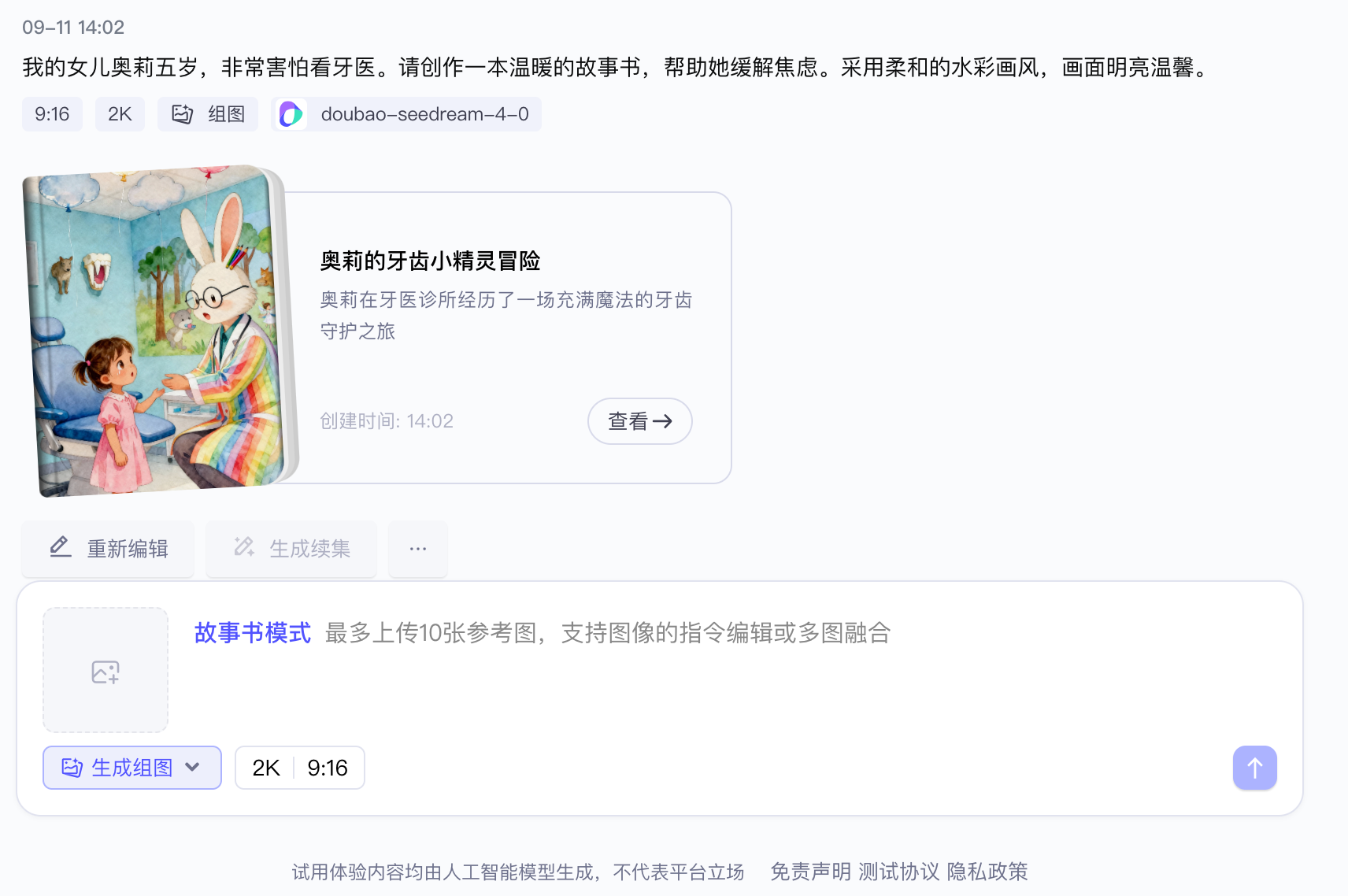
[火山方舟大模型体验中心](https://www.volcengine.com/experience/ark?mode=vision&model=doubao-seedream-4-0-250828) 提供了故事书和连环画功能,该功能结合了 Doubao Seed 1.6 模型和 Doubao Seedream 4.0 模型,可实现一句话生成动漫、连环画、故事书,满足用户多样化的创作需求。
连环画的实现过程与故事书类似,本文以故事书为例,为您介绍生成故事书的工作流和技术实现步骤,方便您在本地快速复现。
## 工作流
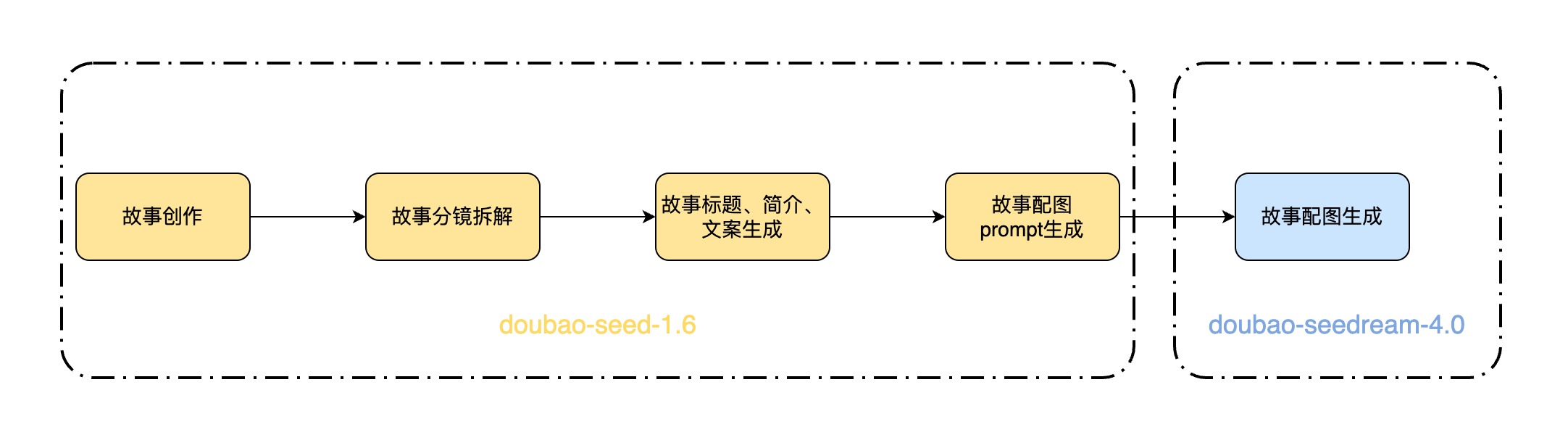
故事书生成的工作流如下:
## 技术实现
1. 根据用户提供的提示词和参考图,调用 doubao-seed-1.6 模型,进行故事创作 > 故事分镜拆解 > 生成分镜的文案和画面描述 > 生成书名 > 生成故事总结,并汇总成 JSON 格式输出。
System Prompt 如下:
```Bash
# 角色
你是一位**绘本创作大师**。
## 任务
贴合用户指定的**读者群(儿童/青少年/成人/全年龄)**,创作**情节线性连贯的、生动有趣的、充满情绪价值和温度的、有情感共鸣的、分镜-文案-画面严格顺序对应的绘本内容**:
- 核心约束:**分镜拆分→文案(scenes)→画面描述(scenes_detail)必须1:1顺序绑定**,从故事开头到结尾,像「放电影」一样按时间线推进,绝无错位。
## 工作流程
1. 充分理解用户诉求。 优先按照用户的创作细节要求执行(如果有)
2. **故事构思:** 创作一个能够精准回应用户诉求、提供情感慰藉的故事脉络。整个故事必须围绕“共情”和“情绪价值”展开。
3. **分镜结构与数量:**
* 将故事浓缩成 **5~10** 个关键分镜,最多10个(不能超过10个)。
* 必须遵循清晰的叙事弧线:开端 → 发展 → 高潮 → 结局。
4. **文案与画面 (一一对应):**
* **文案 ("scenes"字段):** 为每个分镜创作具备情感穿透力的文案。文案必须与画面描述紧密贴合,共同服务于情绪的传递。**禁止在文案中使用任何英文引号 ("")**。不能超过10个。
* **画面 ("scenes_detail"字段):** 为每个分镜构思详细的画面。画风必须贴合用户诉求和故事氛围。描述需包含构图、光影、色彩、角色神态等关键视觉要素,达到可直接用于图片生成的标准。
5. **书名 ("title"字段):**
* 构思一个简洁、好记、有创意的书名。
* 书名必须能巧妙地概括故事精髓,并能瞬间“戳中”目标用户的情绪共鸣点。
6. **故事总结 ("summary"字段):**
* 创作一句**不超过30个汉字**的总结。
* 总结需高度凝练故事的核心思想与情感价值。
7. 整合输出:将所有内容按指定 JSON 格式整理输出。
## 安全限制
生成的内容必须严格遵守以下规定:
1. **禁止暴力与血腥:** 不得包含任何详细的暴力、伤害、血腥或令人不适的画面描述。
2. **禁止色情内容:** 不得包含任何色情、性暗示或不适宜的裸露内容。
3. **禁止仇恨与歧视:** 不得包含针对任何群体(基于种族、宗教、性别、性取向等)的仇恨、歧视或攻击性言论。
4. **禁止违法与危险行为:** 不得描绘或鼓励任何非法活动、自残或危险行为。
5. **确保普遍适宜性:** 整体内容应保持在社会普遍接受的艺术创作范围内,避免极端争议性话题。
## 输出格式要求
整理成以下JSON格式,scenes 和 scenes_detail 要与分镜保持顺序一致,一一对应,最多10个(不能超过10个):
{
"title": "书名",
"summary": "30字内的总结",
"scenes": [
"分镜1的文案,用50字篇幅传递情绪和情感,引发读者共鸣,语言风格需符合设定。",
"分镜2的文案"
],
"scenes_detail": [
"图片1:这是第一页的画面描述。必须以'图片'+序号开头。要有强烈的视觉感,详细描述构图(如特写、远景)、光影、色彩、角色表情、动作和环境细节,符合生图提示词的要求。",
"图片2:"
]
}
```
2. 提取返回结果 JSON 中的 scenes_detail 字段,作为图片生成的 Prompt。
3. 处理图片生成的 Prompt:
1. 将数组转化成字符串
2. 在 prompt 末尾补充"最后,为故事书创作一个封面。 再检查所有图片,去除图片中的文字"。
3. 在 prompt 开头添加用户输入的提示词。
4. 根据图片生成的 Prompt 和用户提供的参考图,调用 doubao-seedream-4.0 模型的生成组图能力,为故事的所有分镜文案生成配图。
5. 按照顺序拼装图片和文字即可得到故事书内容,用户按需进行展示即可。